
What Is WordPress MCP and Why It Matters for Your Store
Learn what the Model Context Protocol is, how it connects AI to your WordPress store data, and why it will transform WooCommerce store management.
By Wana Daliri · Peligent Blog
If you have tried using AI tools with your WordPress site, you have probably hit the same wall every store owner faces. ChatGPT can write product descriptions, but it has no idea what products you sell. AI image tools can enhance photos, but they cannot access your media library. Every AI tool works in isolation, completely disconnected from your actual store data.
This is exactly the problem that the Model Context Protocol was designed to solve. In this guide, we will explain what WordPress MCP is, how it works, and why it is about to change the way WooCommerce store owners use AI.
What Is MCP?
MCP stands for Model Context Protocol. It is an open standard created by Anthropic that defines how AI models connect to external data sources and tools. Think of it as a universal adapter between AI and your applications.
Before MCP, every AI tool had to build its own custom integration with every platform it wanted to talk to. This meant fragile API hacks, screen scraping, and constant copy-pasting between tools. MCP replaces all of that with a single, standardized connection.
In plain terms: MCP lets AI actually understand your store, not just generate generic content in a vacuum.
Why this matters for store owners
Without MCP, using AI for your WooCommerce store means constantly providing context manually. You paste product data into ChatGPT, copy the output back, and repeat for every task. With MCP, the AI already has access to your catalog, orders, and customer data. It can generate content, answer questions, and take actions without you bridging the gap.
How WordPress MCP Works
A WordPress MCP server runs as a plugin on your site. It exposes your WordPress and WooCommerce data through the MCP protocol, which any compatible AI client can connect to.
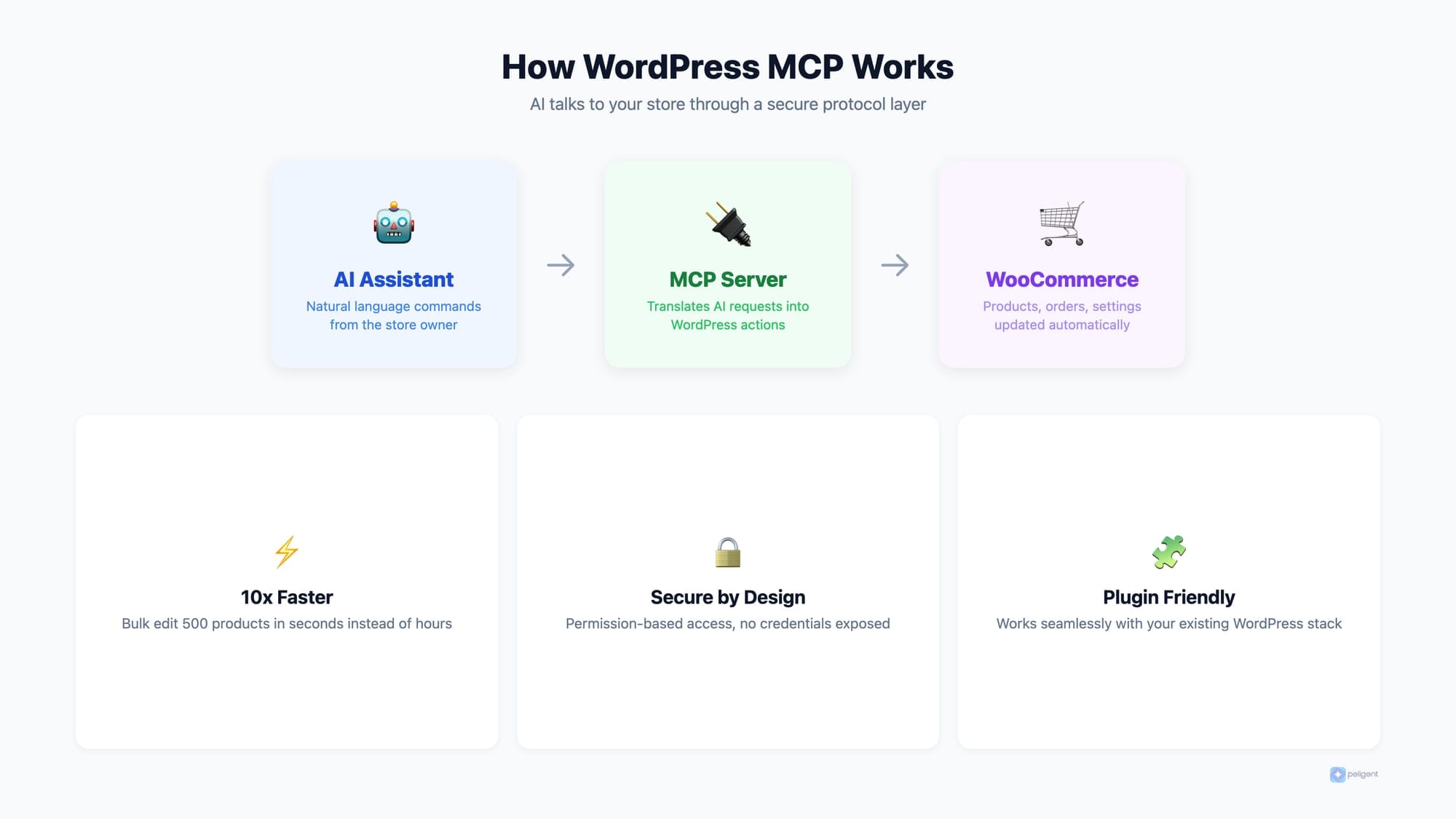
Here is the typical flow:
- You ask a question in an AI tool, for example: "What were my top-selling products last month?"
- The AI connects to your WordPress MCP server
- The MCP server queries your WooCommerce database securely
- The AI receives the data and generates a meaningful, contextual answer
The key difference from traditional API integrations is that MCP is bidirectional and contextual. The AI does not just get raw data. It understands the schema, relationships, and meaning behind your store data. It knows that "Blue Running Shoes" is a product in the "Footwear" category with 47 sales last month and a 4.8 star rating.
The technical layer (simplified)
MCP uses a client-server architecture. Your WordPress site runs an MCP server (installed as a plugin), and AI tools act as MCP clients. Communication happens over a secure, authenticated channel. The server defines what data is available ("resources") and what actions the AI can take ("tools"). The AI client discovers these capabilities automatically, meaning it adapts to your specific store setup without manual configuration.
What MCP Can Do for WooCommerce Stores
Once your store has an MCP connection, AI tools can do things that were previously impossible or required expensive custom development.
Intelligent product management
AI can read your entire catalog and make smart suggestions. It can identify products with weak descriptions, missing images, or poor SEO metadata and fix them automatically. Instead of manually auditing 500 products, you ask the AI to do it in seconds.
Real-time business intelligence
Ask natural language questions about your store and get instant answers:
- "Which products have the highest return rate?"
- "What is my average order value this quarter compared to last?"
- "Show me customers who haven't ordered in 90 days"
- "What percentage of my revenue comes from repeat customers?"
- "Which product categories grew the most this month?"
No need to dig through WooCommerce reports or export CSV files. The AI has direct access to your data.
Automated content creation with context
This is where MCP really shines. Instead of generic AI content, you get content that is informed by your actual products, pricing, and brand voice. An AI connected via MCP can write a blog post about your best-selling items because it actually knows what they are. It can create product descriptions that reference real features and specifications from your database.
Proactive monitoring and alerts
AI tools connected via MCP can continuously monitor your store and alert you to issues before they become problems. Low stock on a trending product? Sudden spike in error logs? A plugin conflict slowing down checkout? The AI catches it because it has persistent access to your store data.
This is exactly the approach that Peligent takes with its suite of automated monitoring bots. Rather than waiting for you to check reports, AI bots continuously analyze your store and deliver actionable insights on a schedule.
Real-World Examples: MCP in Action
To make this concrete, here are scenarios where MCP transforms everyday store management tasks:
Scenario 1: Seasonal product updates
It is December and you need to update 200 product descriptions to include holiday-themed language and gift suggestions. Without MCP, this means hours of manual editing or hiring a freelancer. With MCP, you tell the AI: "Update all products in the Gift category to include holiday messaging while keeping the original product details." The AI reads each product, understands its attributes, and generates contextual updates. Combined with bulk editing tools, the entire catalog gets updated in minutes.
Scenario 2: Customer behavior analysis
You want to know why sales dropped last week. Without MCP, you export data from WooCommerce, import it into a spreadsheet, and try to spot patterns. With MCP, you ask: "Why did sales drop last week compared to the previous week?" The AI analyzes order data, traffic patterns, product views, and cart abandonment rates to give you a specific answer, like "Sales of your top-selling item dropped 40% because it went out of stock on Tuesday. You also had a 15% increase in cart abandonment on mobile, suggesting a checkout issue."
Scenario 3: Competitor-aware content
You want to write a blog post about your best products, but you want it to be informed by actual sales data, not guesswork. An MCP-connected AI knows your top sellers, their margins, their review scores, and their trending direction. It writes content that highlights products strategically, not randomly.
MCP vs Traditional WordPress APIs
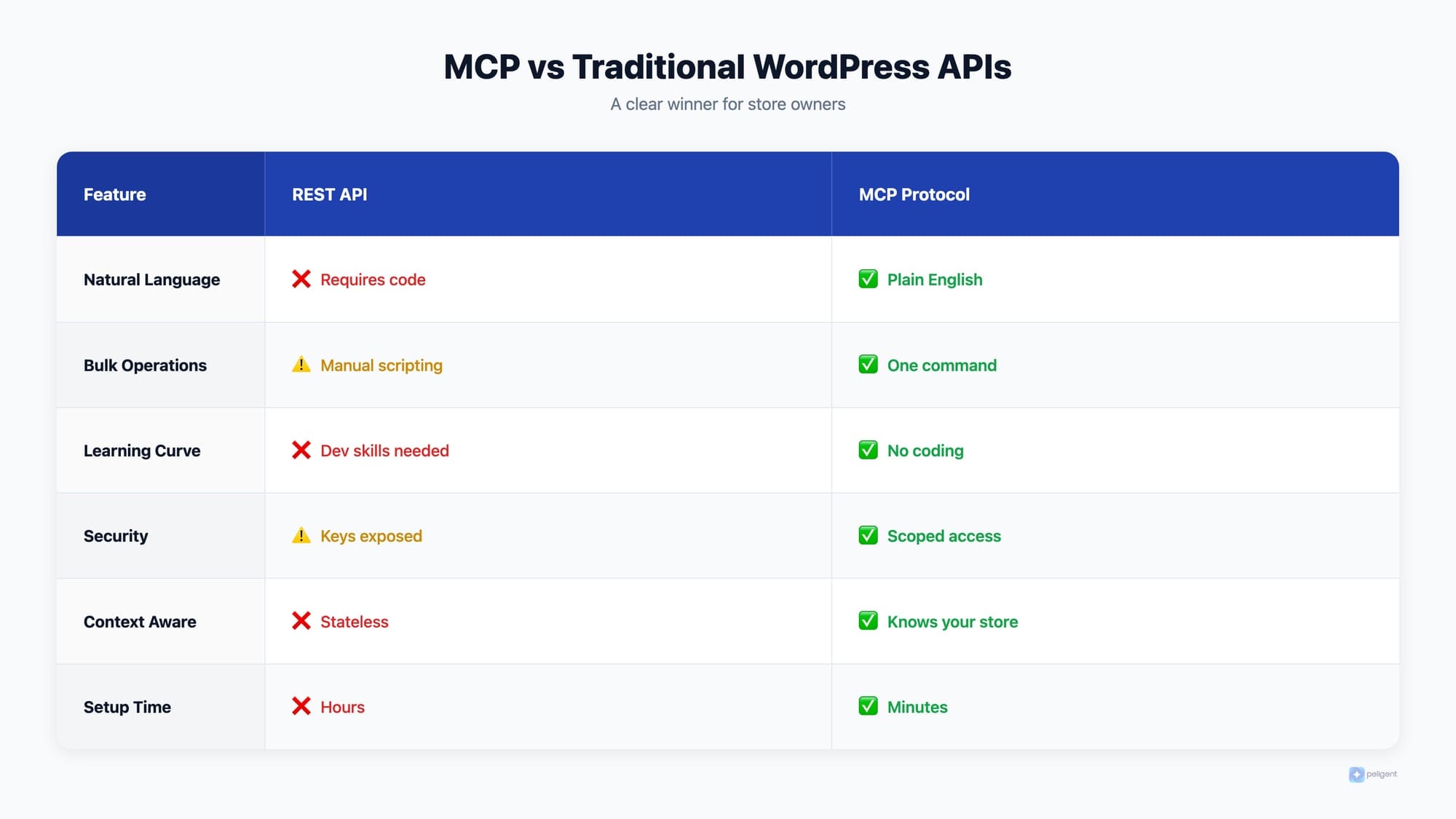
WordPress already has a REST API. So why do we need MCP? The differences are significant:
Context awareness
The REST API returns raw data. MCP provides data with context and meaning. When an AI queries orders through MCP, it understands the relationship between the order, the customer, the products, and the fulfillment status. Through the REST API, it just gets JSON blobs that require interpretation.
Bidirectional communication
The REST API is request-response: you ask, it answers. MCP supports ongoing, bidirectional communication. The AI can maintain a conversation with your store, building up context over multiple interactions.
Standardization
Every plugin implements the REST API differently. MCP provides a universal standard, meaning any MCP-compatible AI tool works with any MCP-enabled WordPress site. No custom integration work required.
Security by design
MCP includes built-in permission scoping. You control exactly what data the AI can access and what actions it can take. Unlike API keys that often grant broad access, MCP connections can be granularly restricted to specific data types and operations.
Discovery
With the REST API, an AI tool needs to know in advance what endpoints exist and how to use them. MCP supports automatic discovery: the AI client asks the server what resources and tools are available, then adapts accordingly. This means MCP-based tools work with any WordPress setup without custom configuration.
The Current State of WordPress MCP
WordPress MCP is still in its early stages, but adoption is accelerating. Several WordPress plugins already offer MCP server functionality, and major AI platforms are adding MCP client support.
For WooCommerce store owners, the practical impact is already real. Plugins like Peligent's AI Assistant use MCP principles to connect AI directly to your store data. You can ask questions about your business in natural language and get answers that are based on your actual numbers, not generic advice.
The ecosystem is growing fast. As more AI tools adopt MCP as their standard connection protocol, the number of integrations available to WordPress site owners will multiply without any additional technical work on your part.
How to Prepare Your Store for MCP
You do not need to wait for MCP to become mainstream to start benefiting. Here is what you can do today:
Clean up your data
AI is only as good as the data it has access to. Make sure your product descriptions, categories, and tags are well organized. Fill in missing product attributes. The better your data, the smarter AI tools will be when they connect to it.
Start using AI-native WordPress tools
Plugins that already connect AI to your store data give you an immediate advantage. AI content generation that understands your products, bulk editing powered by AI, and automated monitoring are all available now. Check out our roundup of the best AI plugins for WordPress in 2026.
Keep your WordPress and WooCommerce updated
MCP support will come through plugin updates and possibly WordPress core. Staying current ensures you can adopt new capabilities as they become available.
Think about your AI strategy
Which parts of running your store take the most time? Product management? Customer service? Content creation? Marketing? Identify your biggest time sinks and look for AI tools that address them. MCP will make these tools dramatically more effective.
Invest in your SEO foundation
AI-powered content is only valuable if it ranks. Make sure your store's SEO foundation is solid before scaling content production with AI tools.
The Future of AI-Powered E-Commerce
MCP represents a fundamental shift in how AI interacts with web applications. For WordPress and WooCommerce, this means moving from "AI that helps you write things" to "AI that truly understands and runs your business."
Imagine an AI that notices your best-selling product is running low on stock, drafts a reorder email to your supplier, writes a social media post promoting a related product that has excess inventory, and adjusts your homepage to feature items with healthy margins. All automatically, all based on real-time store data.
That future is closer than most store owners realize. The stores that start building their AI infrastructure today will have a massive advantage when these capabilities become standard.
The winners in e-commerce over the next few years will not necessarily be the stores with the biggest budgets. They will be the ones that most effectively leverage AI to understand their customers, optimize their operations, and create compelling experiences. MCP is the infrastructure layer that makes all of that possible.
Frequently Asked Questions
Is WordPress MCP free to use?
The MCP protocol itself is open source and free. Individual plugins that implement MCP may have their own pricing, but the standard is open to everyone.
Do I need technical knowledge to use MCP?
No. MCP works behind the scenes. As a store owner, you interact with AI tools through natural language. The MCP connection handles the technical communication between the AI and your WordPress site.
Is MCP secure for e-commerce data?
Yes. MCP includes built-in permission scoping, and connections are encrypted. You control exactly what data is shared with AI tools. Sensitive information like payment details can be excluded entirely.
Can MCP work with any WordPress theme?
MCP operates at the data layer, not the presentation layer. It works with any WordPress theme because it connects to your database and plugin data, not your frontend design.
How is this different from just using ChatGPT?
ChatGPT has no access to your store data. It can only generate generic content based on its training data. An AI connected via MCP can generate content, answer questions, and take actions based on your actual products, customers, and performance data.
Written by
Wana DaliriAI content writer at Peligent. Covering WordPress, WooCommerce, and AI for e-commerce.
Enjoyed this article?
Subscribe to get more WooCommerce insights delivered to your inbox.
Related Articles
View all
Top WooCommerce Stores: 50 Successful Examples and What They Sell
Top WooCommerce Stores: 50 Successful Examples and What Makes Them Profitable WooCommerce has evolved from a simple WordPress plugin into the world's most popular ecommerce platform, powering over 6.5 million online stores worldwide. From bootstrapped startups to Fortune 500 companies, businesses across every conceivable industry rely on
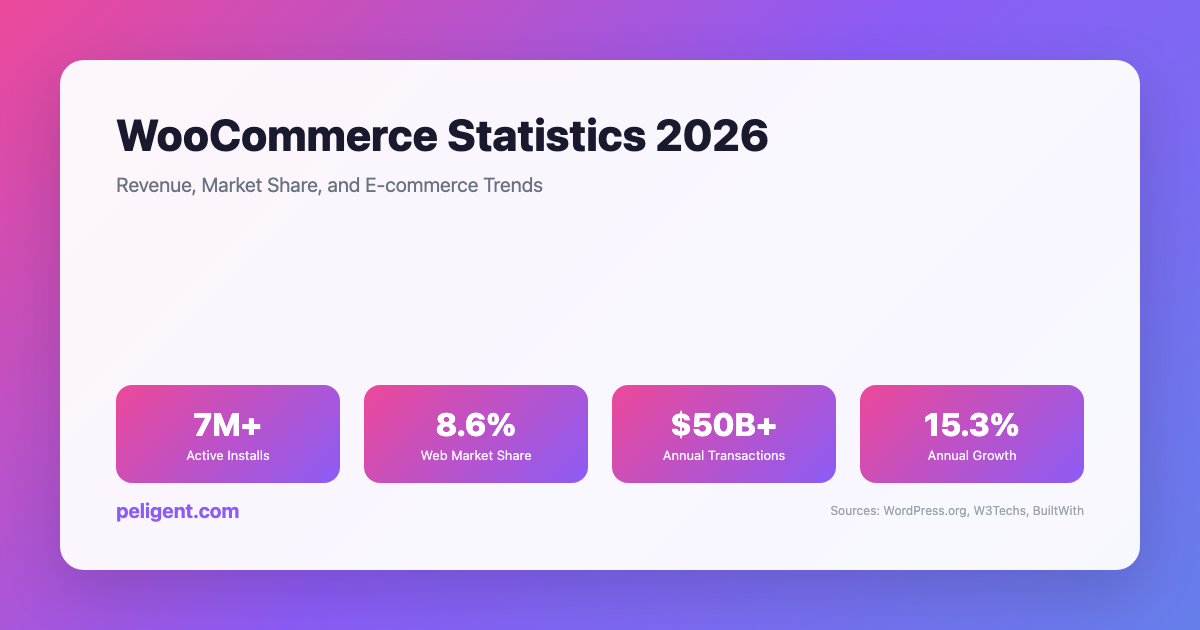
WooCommerce Statistics 2026: Revenue, Market Share, and E-commerce Trends
WooCommerce Statistics 2026: Market Share, Growth, and E-commerce Data WooCommerce has emerged as one of the world's most powerful and popular e-commerce platforms, transforming how businesses sell online. Built as a WordPress plugin, WooCommerce has grown from a simple e-commerce solution to a comprehensive platform powering millions of
AI Product Photo Enhancement for WordPress: Transform Your Store Images
Picture this: a shopper lands on your WooCommerce product page, glances at the photo for maybe half a second, and decides whether to stay or bounce. If the image looks dim, cluttered, or amateurish, they are gone before they even read the product title. If it looks clean, bright, and