
WooCommerce AEO: How to Get Your Products Recommended by AI
Answer engine optimization for WooCommerce: how to get your products cited and recommended by ChatGPT, Perplexity, and Google AI Overviews in 2026.

Your next customer may never see a Google results page. They will ask ChatGPT "what is the best waterproof hiking backpack under 150 dollars," read the two products it names, and click straight to checkout. If your WooCommerce store is not one of those named products, you are invisible in the fastest growing shopping channel of 2026. Answer engine optimization (AEO) is how you fix that.
TL;DR
Answer engine optimization (AEO) for WooCommerce is the practice of structuring your product data, content, and crawler access so AI engines like ChatGPT, Perplexity, and Google AI Overviews confidently name your products in their answers. It is the new storefront window, and it rewards clean structured data over keyword stuffing.
- AI referrals to ecommerce sites jumped 752 percent year over year, and ChatGPT shopping traffic converts about 31 percent higher than traditional organic search.
- 83 percent of products ChatGPT shows in shopping carousels come straight from Google Shopping data, so your Merchant Center feed is now an AEO asset.
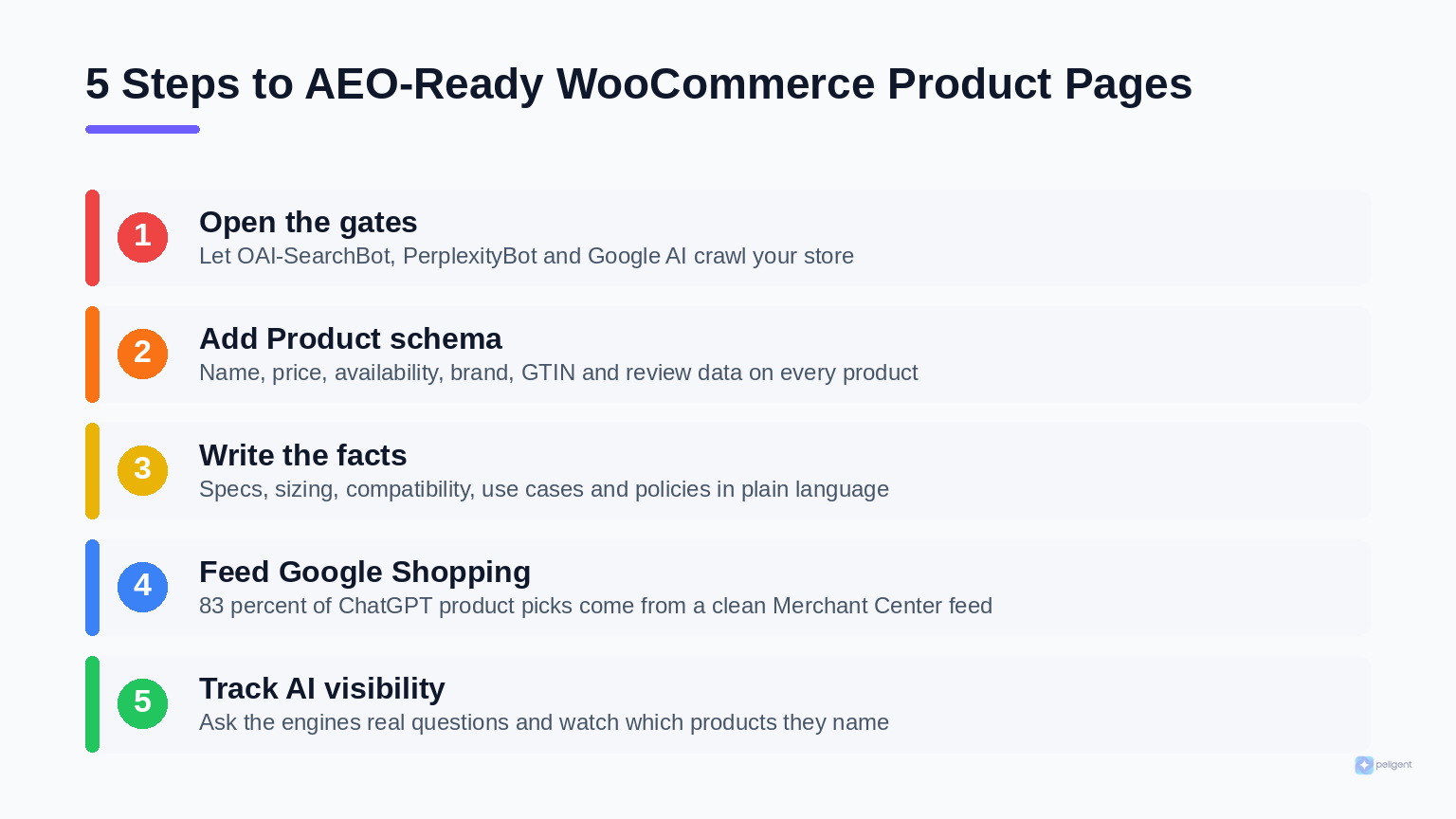
- Allow OAI-SearchBot, PerplexityBot, and Google-Extended to crawl your store, or you cannot be recommended at all.
- Complete Product schema (price, availability, brand, GTIN, reviews) gives AI an unambiguous source to quote.
- Write the facts shoppers ask for: specs, sizing, compatibility, use cases, and policies in plain, quotable language.
Table of contents
- What is WooCommerce AEO?
- Why does getting recommended by AI matter for WooCommerce?
- How do AI answer engines pick which products to recommend?
- How do you let AI engines crawl your WooCommerce store?
- What product schema does your store need for AEO?
- How should you write product content for answer engines?
- How does your Google Shopping feed affect ChatGPT?
- How can Peligent automate WooCommerce AEO?
- Frequently asked questions
What is WooCommerce AEO?
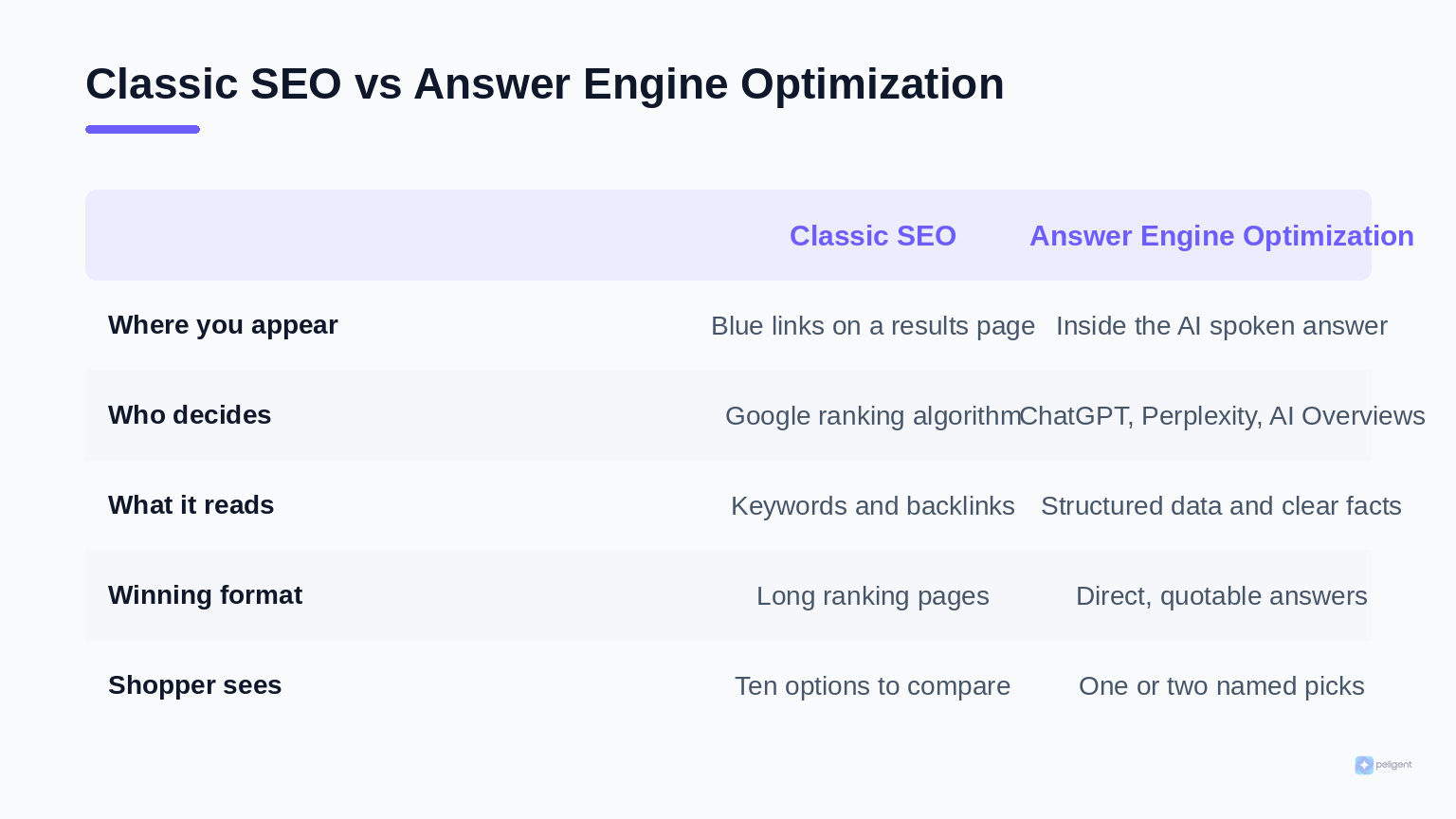
WooCommerce AEO is the practice of structuring your store so AI answer engines can find, trust, and quote your products inside their generated answers. Where classic SEO fights for a blue link on a results page, AEO fights to be the single product the AI names when a shopper asks for a recommendation.
You will see three labels used almost interchangeably, and it helps to know the nuance. Answer engine optimization (AEO) is about getting cited directly inside conversational engines like ChatGPT Search and Perplexity. Generative engine optimization (GEO) targets visibility inside AI summaries such as Google AI Overviews and AI Mode. Both are the same core job: make your product data so clean and complete that a machine can repeat it without guessing. Classic SEO still matters, because answer engines lean heavily on the pages and feeds that already rank, but the winning content format has changed.
Why does getting recommended by AI matter for WooCommerce?
It matters because shoppers are moving their product research into AI chat, and that traffic buys. Direct referrals from AI engines like ChatGPT and Perplexity to ecommerce sites surged 752 percent year over year, and that traffic is not just curious browsers. ChatGPT ecommerce referrals have been measured converting at roughly 31 percent higher than traditional organic search, because the shopper arrives already pre-sold by a trusted answer.
The strategic problem is that AI answers are a winner-take-few channel. A Google results page shows ten options and lets the shopper compare. An answer engine often names one or two products and moves on. If you are not in that short list, you do not get a smaller slice of the click, you get nothing. That is why AEO is not a nice-to-have bolt-on to your existing WooCommerce SEO checklist; it is a separate race for a separate, high-intent shelf.
"Classic SEO wins you a place in a list of ten. Answer engine optimization wins you the recommendation. In AI shopping, second place is invisible."
How do AI answer engines pick which products to recommend?
Answer engines pick products they can verify, structure, and trust, not the ones with the best ad budget. Under the hood, an engine like ChatGPT or Perplexity pulls from a blend of live web crawling, structured product feeds, third-party review signals, and its own training data, then assembles an answer it can defend. Three factors decide whether your store makes the cut.
- Can it reach you? If your store blocks AI crawlers, the engine cannot consider you regardless of how good your products are.
- Can it parse you? Structured data and clean feeds let the engine read price, availability, and specs as facts rather than guessing from prose.
- Can it trust you? Consistent details across your product page, your Google Shopping feed, and review platforms tell the engine your data is reliable.
This is the same shift that powers modern on-site discovery. If you have read our guide to WooCommerce AI search, the logic will feel familiar: machines match meaning and structured facts, not just keywords. AEO simply applies that logic to the engines living outside your store.
Want AI engines to name your products, not your competitors?
Peligent reads your catalog and rewrites product data into the clean, structured, quotable facts answer engines reward.
How do you let AI engines crawl your WooCommerce store?
You let them in by allowing the right bots in your robots.txt and server rules, because blocking an AI search crawler quietly removes you from its recommendations. This is the single most common own goal in 2026: stores that tightened their robots rules to keep scrapers out and accidentally locked out the engines sending high-intent buyers.
The key is that these crawlers are not all the same, and you can be selective.
- OAI-SearchBot powers ChatGPT Search referrals. Allow it so you can appear in answers.
- GPTBot collects training data. You can block this one and still keep search visibility, if you prefer not to feed model training.
- PerplexityBot handles Perplexity citations. Allow it.
- Google-Extended governs whether your content feeds Google AI Overviews and Gemini. Allow it for AI Overview visibility.
After you set your rules, verify them. Fetch your own robots.txt, confirm the search bots are not disallowed, and watch your server logs for those user agents actually crawling. A misconfigured security plugin or CDN rule can silently re-block them, so this is worth a periodic check rather than a one-time fix.
What product schema does your store need for AEO?
Your store needs complete, accurate Product structured data on every product page, because that is the cleanest signal an AI can read. A product page with full Product schema gives answer engines an unambiguous source for the facts they are most often asked to compare. At minimum, mark up:
- name, description, and brand
- offers with price, priceCurrency, and availability
- sku and a global identifier such as gtin or mpn
- aggregateRating and review data when you have genuine reviews
- image, and where relevant, color, size, and material
Most WooCommerce SEO plugins (Yoast, Rank Math, or a dedicated schema plugin) output a baseline of this automatically, but the default rarely covers GTINs, detailed attributes, or review data on every product. The gap is almost never the plugin; it is the underlying product fields sitting empty. Fill the fields and the schema follows. The same discipline that wins rich snippets in Google, covered in our SEO checklist, is what makes your data quotable to an AI.
How should you write product content for answer engines?
Write the specific facts a shopper would ask an AI, in plain language the AI can lift word for word. Answer engines reward content that reads like a confident, complete answer, not marketing fluff. A description that says "buttery soft and effortlessly stylish" gives an AI nothing to quote. A description that says "100 percent merino wool, machine washable cold, true to size, rated for 5 to 20 degrees Celsius" gives it five facts it can repeat.
Practical moves that make product copy AEO-friendly:
- Lead with the answer. State what the product is and who it is for in the first sentence.
- Surface structured facts. Specs, dimensions, compatibility, materials, and care should be explicit, not implied.
- Add comparison and use-case context. "Best for narrow feet" or "works with all 2026 models" is exactly the phrasing engines match to shopper questions.
- Answer the obvious questions on the page. Shipping, returns, sizing, and warranty in a short FAQ block doubles as AEO fuel.
This is exactly the kind of catalog-wide rewriting that is brutal to do by hand and natural for AI. Our guide to writing WooCommerce product descriptions that sell covers the conversion side; AEO simply adds the requirement that the facts be explicit and consistent.
How does your Google Shopping feed affect ChatGPT?
Your Google Shopping feed affects ChatGPT directly, because most of the products ChatGPT shows in shopping results come from that feed. Analysis across 43,000 products found that 83 percent of the items ChatGPT surfaces in its shopping carousels are pulled from Google Shopping data. In other words, the feed you built for Google ads is now also feeding the largest AI assistant on the planet.
That makes Merchant Center feed quality a frontline AEO task. Keyword-rich but accurate titles, complete attributes (GTIN, brand, condition, availability), and non-promotional descriptions that match your product page all raise the odds an AI picks you. The flip side is that a messy feed full of missing GTINs and vague titles keeps you out of the carousel no matter how good the product is. Treat your feed as structured product truth, keep it consistent with your on-page schema, and you cover both Google Shopping and ChatGPT in one move.
How can Peligent automate WooCommerce AEO?
Peligent automates the parts of AEO that are pure catalog labor: making thousands of product records clean, complete, and consistent. AEO is not one clever trick; it is hundreds of small data fixes across your whole store, which is exactly where an AI co-pilot earns its keep.
- Rewrites product copy into quotable facts at scale, turning vague descriptions into explicit specs, use cases, and sizing that engines can lift.
- Fills the empty fields that break schema, like missing GTINs, brands, materials, and attributes, so your Product structured data is actually complete.
- Cleans your feed and on-page data together so your Google Shopping titles, attributes, and descriptions stay consistent with your product pages, the consistency answer engines reward.
- Surfaces the gaps across hundreds of SKUs, so you fix the products holding back your AI visibility instead of guessing.
If you are already connecting AI tools to your store, our explainer on WooCommerce MCP shows how an AI co-pilot reads and acts on live catalog data, and our overview of AI in WooCommerce sets the broader context. AEO is where that capability turns into found revenue.
Frequently asked questions
What is the difference between AEO and SEO for WooCommerce?
SEO optimizes for ranking links on a search results page, while AEO optimizes for being named and cited inside an AI engine answer. SEO rewards keywords, backlinks, and ranking pages; AEO rewards clean structured data, explicit facts, and crawler access. They overlap, because answer engines draw on pages that already rank, but the winning content format is different. You need both in 2026.
How do I get my WooCommerce products recommended by ChatGPT?
Allow OAI-SearchBot to crawl your store, mark up every product with complete Product schema, write descriptions full of explicit facts, and maintain a clean Google Shopping feed, since most ChatGPT shopping picks come from that feed. The goal is to make your product data so structured and consistent that ChatGPT can quote it with confidence.
Does AEO replace traditional WooCommerce SEO?
No. AEO sits on top of solid SEO rather than replacing it. Answer engines lean on the same well-structured, fast, authoritative pages that rank in Google, so your existing SEO work is the foundation. AEO adds structured data depth, explicit factual content, and AI crawler access on top of it.
Will blocking AI bots protect my content or hurt my sales?
It depends on which bot. Blocking training crawlers like GPTBot keeps your content out of model training with little downside, but blocking search crawlers like OAI-SearchBot or PerplexityBot removes you from AI recommendations and the high-intent traffic they send. The common best practice is to allow the search and citation bots while optionally blocking the training-only ones.
How do I measure whether AEO is working?
Ask the engines the real questions your customers ask, in ChatGPT, Perplexity, and Google AI Overviews, and record whether your products get named or cited. Track referral traffic from AI sources in your analytics, and watch it grow as you fix schema, content, and feed quality. Dedicated AI-visibility trackers can monitor citations across multiple engines if you want a continuous signal.
How long does WooCommerce AEO take to show results?
Crawler and schema fixes can surface in AI answers within days to a few weeks once engines re-crawl your store, faster than classic SEO ranking gains. Content depth and feed quality compound over time. The stores that win early are the ones that fix the technical basics now, while most competitors have not started.
Written by
Pouria DaliriEnjoyed this article?
Subscribe to get more WooCommerce insights delivered to your inbox.
Related Articles
View all
WooCommerce Product Recommendations: How AI Personalizes Every Visit
Default related products only match tags. See how AI product recommendations use real shopper behavior to lift conversions, order value, and revenue.
WooCommerce CSV Import: How to Bulk Upload Products Without the Headaches
A practical 2026 guide to importing WooCommerce products from a CSV file, fixing the errors that break most imports, and cleaning up your catalog with AI.
WooCommerce AI Chatbot: How to Add a Smart Shopping Assistant That Sells (2026)
A practical guide to adding an AI chatbot to your WooCommerce store in 2026: how it works, the features that matter, setup steps, and the best practices that turn chats into sales.