
WooCommerce AI: How Artificial Intelligence Is Changing Online Stores in 2026
AI is transforming WooCommerce stores in 2026. Learn how to use artificial intelligence for content, SEO, customer support, and product management to grow your online store.
Artificial intelligence is no longer a buzzword for WooCommerce store owners. It is the technology behind the stores that are growing while everyone else stays flat.
In 2026, AI tools handle everything from writing product descriptions to predicting which customers are about to leave. Stores that adopt AI early are seeing 20 to 40% improvements in conversion rates, organic traffic, and average order value. Stores that ignore it are falling behind fast.
This guide breaks down exactly how AI is changing WooCommerce, which areas of your store benefit most, and the specific tools you can implement today to see real results.
Table of Contents
- What WooCommerce AI Actually Means
- AI-Powered Content Generation
- Smart Product Recommendations
- AI Customer Support and Chatbots
- SEO Automation with AI
- AI Product Photo Enhancement
- Dynamic Pricing and Inventory
- AI-Powered Analytics and Reporting
- How to Choose the Right AI Tools
- Getting Started with AI in WooCommerce
- FAQ
What WooCommerce AI Actually Means
When people say "WooCommerce AI," they are talking about artificial intelligence tools that integrate directly with your WordPress and WooCommerce store to automate tasks, generate content, analyze data, and improve the customer experience.
This is not about replacing humans. It is about eliminating the repetitive, time-consuming work that keeps store owners stuck in day-to-day operations instead of growing their business.
Here is what AI can handle for a WooCommerce store right now:
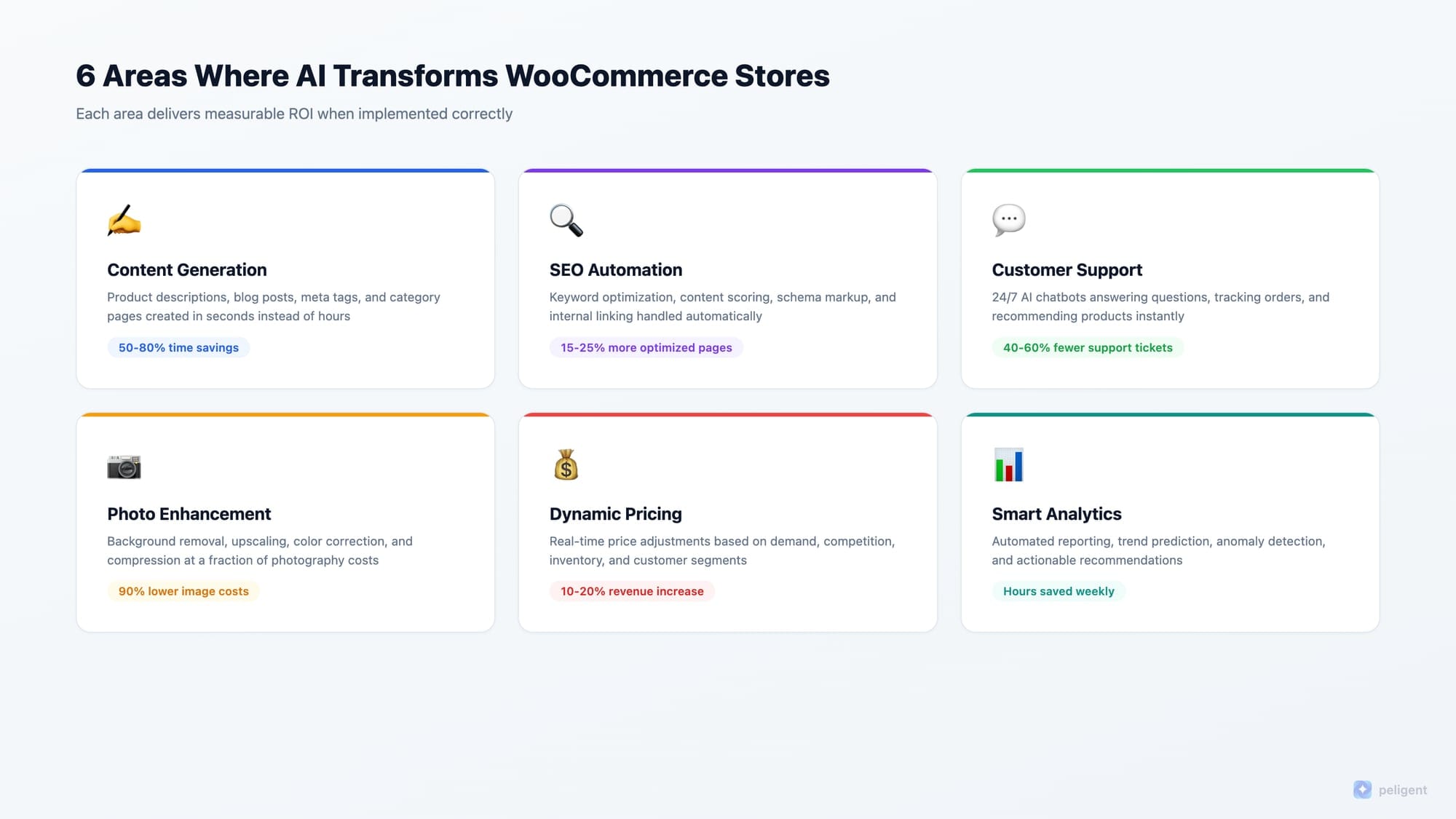
- Content creation: Product descriptions, blog posts, meta tags, and category pages generated in seconds
- Customer support: Intelligent chatbots that answer questions, recommend products, and handle common issues 24/7
- SEO optimization: Automated keyword research, content scoring, and on-page optimization
- Visual content: Product photo enhancement, background removal, and image optimization
- Analytics: Sales forecasting, customer behavior prediction, and automated reporting
- Personalization: Product recommendations, dynamic pricing, and targeted email campaigns
The stores seeing the biggest gains are not using AI for just one thing. They are layering multiple AI tools across their entire operation.
AI-Powered Content Generation
Content is the foundation of every successful WooCommerce store. Product descriptions sell your products. Blog posts bring organic traffic. Meta tags determine whether people click your search results. And most store owners do not have time to write all of it well.
AI content generation solves this at scale.
Product descriptions
Writing unique, SEO-optimized descriptions for hundreds or thousands of products is the single biggest content challenge WooCommerce stores face. Copying manufacturer descriptions creates duplicate content that Google penalizes. Writing them manually takes hours per product.
AI description generators analyze your product data (title, category, attributes, images) and create complete descriptions with proper keyword placement, benefit-focused copy, and calls to action. The best tools produce descriptions that score 80+ on SEO readability metrics right out of the box.
For a deep dive into writing descriptions that convert, check out our guide on how to write WooCommerce product descriptions that actually sell.
Blog content
Consistent blog content drives organic traffic to your store. AI writing tools can generate full blog posts, outlines, and content calendars based on your target keywords and industry. The key is using AI as a starting point, then adding your expertise, brand voice, and unique insights.
Stores that publish 2 to 4 AI-assisted blog posts per week typically see organic traffic increases of 30 to 50% within three months.
Meta tags and SEO copy
Every product page needs a unique meta title and meta description. For stores with hundreds of products, this is a tedious manual task. AI tools generate optimized meta tags that include target keywords, stay within character limits, and include compelling language that improves click-through rates from search results.
Smart Product Recommendations
Product recommendations powered by AI drive 10 to 30% of total ecommerce revenue. The difference between basic "related products" and AI-powered recommendations is dramatic.
How AI recommendations work
Traditional WooCommerce recommendations show products from the same category or products you manually link. AI recommendation engines go much further. They analyze:
- Individual browsing history and behavior patterns
- Purchase history across all customers to find correlations
- Real-time session data (what the visitor just viewed, added to cart, or searched for)
- Seasonal and trending data
- Customer segments and demographic patterns
The result is truly personalized recommendations that change for every visitor, on every page, in real time.
Where to display AI recommendations
The highest-converting placements for AI product recommendations:
- Product pages: "Customers who bought this also bought" and "Frequently bought together" sections
- Cart page: Upsells and complementary products before checkout
- Homepage: Personalized "Recommended for you" sections for returning visitors
- Post-purchase emails: Recommendations based on what the customer just bought
- Search results: AI-enhanced search that shows products matching intent, not just keywords
Tools for WooCommerce
Clerk.io, Recombee, and Barilliance are popular AI recommendation engines with WooCommerce integrations. WooCommerce also has built-in related products and cross-sell functionality that serves as a baseline.
AI Customer Support and Chatbots
Customer support can make or break a WooCommerce store. AI chatbots handle the reality that most stores cannot afford 24/7 human support, but customers expect instant answers at any hour.
What AI chatbots do for WooCommerce
Modern AI chatbots go far beyond scripted FAQ responses. They:
- Answer product questions by pulling information directly from your product pages
- Track orders and provide shipping updates in real time
- Recommend products based on the conversation context
- Handle returns and exchanges following your store policies
- Escalate complex issues to human agents with full conversation history
The impact on conversions
Stores with AI chatbots see measurable improvements in key metrics:
- Average response time drops from hours to seconds
- Cart abandonment decreases by 15 to 25% when chatbots intervene during checkout hesitation
- Customer satisfaction scores improve because questions get answered immediately, even at 3 AM
- Support ticket volume drops by 40 to 60% as chatbots handle common questions automatically
The best WooCommerce AI chatbots connect directly to your product catalog, order system, and customer data so they can provide specific, accurate answers instead of generic responses. AI-powered chat solutions built for WooCommerce understand your store context and can handle everything from "Is this available in blue?" to "Where is my order?"
SEO Automation with AI
SEO is the highest-ROI marketing channel for WooCommerce stores, but it is also the most time-intensive. AI changes the equation by automating the tedious parts while keeping the strategic thinking human.
Keyword research and content planning
AI tools analyze your products, competitors, and search trends to identify the keywords worth targeting. Instead of spending hours in keyword research tools, AI delivers a prioritized list of opportunities with difficulty scores, search volume estimates, and content recommendations.
On-page optimization
AI SEO tools scan your product pages and identify optimization opportunities: missing meta descriptions, thin content, duplicate titles, broken internal links, and keyword gaps. Some tools fix these automatically. Others provide specific recommendations you can implement in minutes.
For WooCommerce stores, the biggest SEO wins usually come from:
- Writing unique product descriptions (replacing manufacturer copy)
- Optimizing category page content
- Adding proper schema markup for products
- Internal linking between related products and blog content
- Image alt text optimization
Our WooCommerce SEO checklist covers the complete technical and on-page optimization process.
Content scoring
AI content scoring tools evaluate your product descriptions and blog posts against SEO best practices. They check keyword density, readability, heading structure, internal links, and content length, then give you a score with specific improvement suggestions. This takes the guesswork out of SEO content optimization.
AI Product Photo Enhancement
Product photos are the first thing customers look at. Poor quality images kill conversions regardless of how good your descriptions are.
What AI photo tools do
AI-powered image tools for WooCommerce handle:
- Background removal and replacement: Turn cluttered product photos into clean, professional images with white or custom backgrounds
- Image upscaling: Enhance low-resolution product photos to high-quality images without losing detail
- Color correction: Automatically adjust lighting, contrast, and color balance so products look accurate on screen
- Batch processing: Enhance hundreds of product images simultaneously instead of editing them one by one
- Compression: Reduce file sizes for faster page loading without visible quality loss
Professional product photography typically costs $25 to $50 per image. AI photo enhancement tools process images for pennies and deliver results that are comparable for most product categories. AI photo enhancement for WooCommerce connects directly to your media library and processes images without leaving your WordPress dashboard.
Dynamic Pricing and Inventory
Static pricing means you are always leaving money on the table or losing sales to competitors. AI dynamic pricing adjusts your prices based on real-time data.
How AI pricing works
AI pricing engines monitor multiple data points simultaneously:
- Competitor pricing for the same or similar products
- Demand patterns and seasonal trends
- Inventory levels (raise prices when stock is low, lower when overstocked)
- Customer segments (loyalty pricing for returning customers)
- Time-based patterns (peak shopping hours vs quiet periods)
The AI adjusts prices within rules you define (minimum margins, maximum discounts, price floor/ceiling) so you stay in control while maximizing revenue.
Inventory management
AI also predicts inventory needs by analyzing sales velocity, seasonal patterns, and lead times. This prevents two costly problems: stockouts that lose sales and overstock that ties up cash. For WooCommerce stores with hundreds of SKUs, AI inventory forecasting saves thousands of dollars per quarter.
AI-Powered Analytics and Reporting
Most WooCommerce store owners check their analytics dashboard and feel overwhelmed. Pages of data, dozens of metrics, and no clear answer to "What should I do next?"
AI analytics tools solve this by:
- Surfacing what matters: Instead of raw data, AI highlights the insights that need your attention: products losing traction, customer segments growing or shrinking, marketing channels underperforming
- Predicting trends: AI forecasts sales, traffic, and inventory needs so you can plan ahead instead of reacting
- Automating reports: Weekly and monthly reports generated automatically with key metrics, trends, and recommendations delivered to your inbox
- Identifying anomalies: AI flags unusual patterns (sudden traffic drops, conversion rate changes, unexpected returns spikes) before they become major problems
Automated WooCommerce reporting eliminates the hours spent manually pulling data and building spreadsheets. AI does the analysis and tells you what actions to take.
How to Choose the Right AI Tools
The WooCommerce AI tool landscape is crowded. Here is how to evaluate which tools are worth your time and money.
Integration depth matters
The best AI tools connect directly to WooCommerce through native integrations or purpose-built plugins. Avoid tools that require you to export data, process it externally, and re-import. Look for tools that:
- Read your product catalog directly
- Access order and customer data for personalization
- Publish changes back to WooCommerce without manual steps
- Work within your WordPress dashboard
Start with your biggest bottleneck
Do not try to implement AI everywhere at once. Identify the one area that is costing you the most time or money:
- Spending hours writing product descriptions? Start with AI content generation
- Losing customers to unanswered questions? Start with an AI chatbot
- Organic traffic is flat? Start with AI SEO tools
- Product photos look unprofessional? Start with AI image enhancement
Get one tool working well before adding the next. Layering AI tools creates compounding benefits, but only if each one is properly configured.
All-in-one vs point solutions
You have two approaches: use separate AI tools for each function (one for content, one for chat, one for SEO) or use a platform that combines multiple AI capabilities in one place.
Point solutions sometimes offer deeper functionality in their specific area. All-in-one platforms save time on integration, provide consistent data across features, and cost less than buying five separate tools. For most WooCommerce store owners, an all-in-one AI platform purpose-built for WordPress and WooCommerce is the fastest path to results.
For a broader look at AI tools available for WordPress, see our roundup of the top AI plugins for WordPress in 2026.
Getting Started with AI in WooCommerce
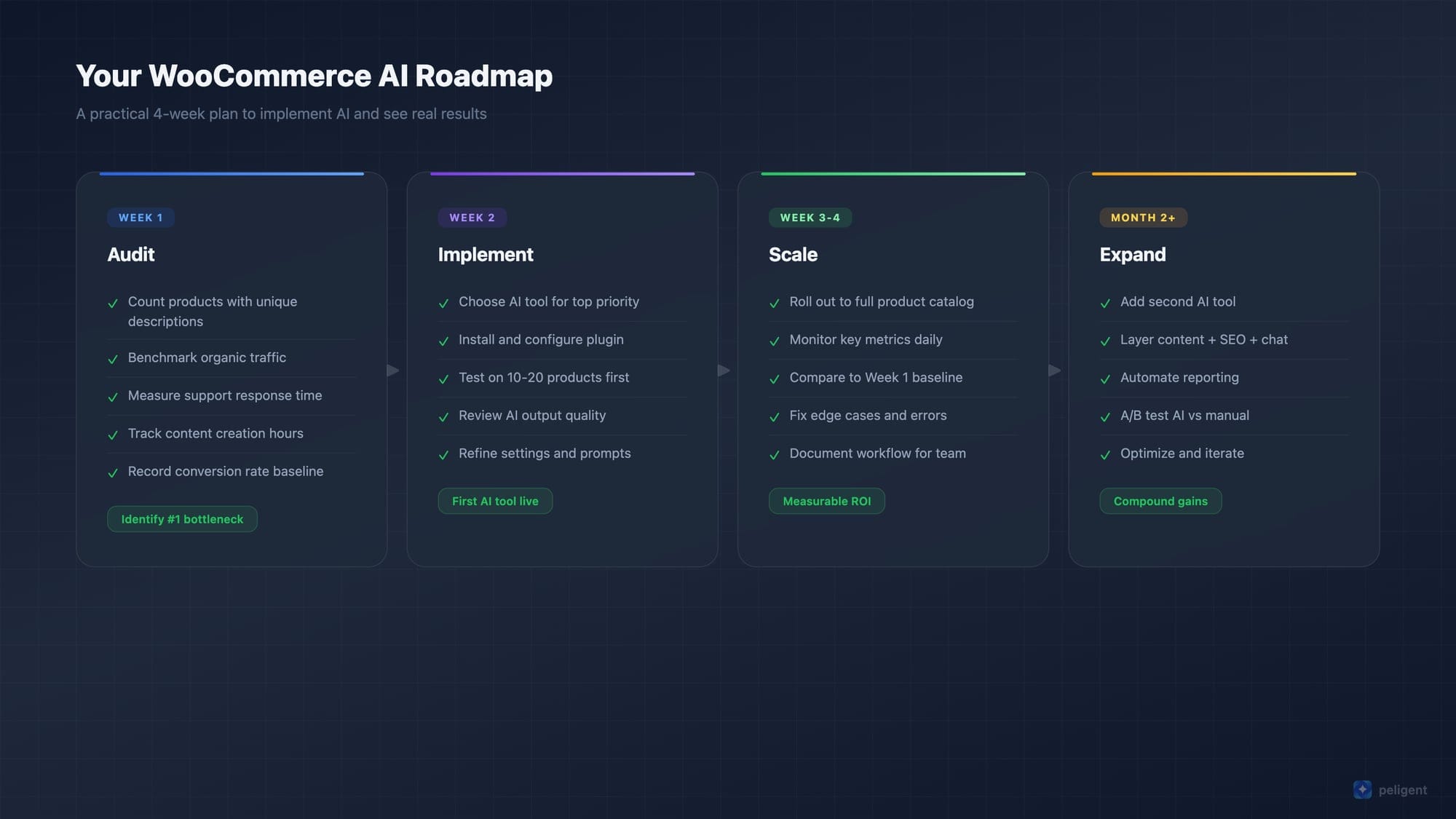
Here is a practical roadmap for adding AI to your WooCommerce store without getting overwhelmed.
Week 1: Audit your current state
Before adding any AI tools, understand where you stand:
- How many products have unique descriptions vs manufacturer copy?
- What is your current organic traffic trend?
- How long does customer support take on average?
- How much time do you spend weekly on content creation?
- What is your conversion rate and how has it changed?
These baseline numbers tell you where AI will have the biggest impact and how to measure success.
Week 2: Implement your first AI tool
Based on your audit, pick the area with the most potential improvement and implement one AI solution. Set it up properly, test it on a small batch of products or pages, and verify the results before rolling out broadly.
Week 3 to 4: Scale and measure
Roll the AI tool out across your full store. Track the metrics you identified in Week 1. Typical results to expect in the first month:
- AI product descriptions: 50 to 80% reduction in content creation time
- AI chatbot: 40 to 60% reduction in support tickets
- AI SEO: 15 to 25% increase in pages meeting optimization standards
- AI photo enhancement: professional-quality images at 90% lower cost than photography
Month 2 and beyond: Layer additional tools
Once your first AI tool is delivering consistent results, add the next one. The compound effect of multiple AI tools working together is where the real transformation happens. A store with AI-generated descriptions, AI-optimized SEO, AI-enhanced photos, and AI customer support creates a customer experience that manual-only stores simply cannot match.
FAQ
What is the best AI tool for WooCommerce?
The best AI tool depends on your biggest need. For content generation and SEO, look for tools built specifically for WooCommerce that understand product data and ecommerce context. Peligent is designed specifically for WordPress and WooCommerce, covering content, SEO, chat support, and photo enhancement in one platform. For product recommendations specifically, Clerk.io and Recombee are strong options.
Will AI replace the need for human content on my store?
No. AI is best used as a force multiplier, not a replacement. Use AI to generate first drafts and handle repetitive tasks, then add human editing for brand voice, accuracy, and unique insights. The combination of AI speed with human quality produces better results than either alone.
How much does WooCommerce AI cost?
Costs range widely. Some AI plugins have free tiers for small stores. Premium all-in-one platforms typically run $30 to $200 per month depending on store size and features. Compare this to the cost of manually doing the same work: hiring a copywriter ($50+ per product description), a customer support agent ($3,000+ per month), or an SEO specialist ($2,000+ per month). AI pays for itself quickly.
Is AI-generated content bad for SEO?
Google's official position is that AI-generated content is fine as long as it is helpful, accurate, and provides value to users. The key is quality, not whether a human or AI wrote it. AI content that is reviewed, edited, and enhanced by humans performs just as well as fully human-written content in search rankings.
Can AI help with WooCommerce store speed?
Indirectly, yes. AI image compression tools significantly reduce page load times by optimizing product photos. AI can also identify performance bottlenecks through automated monitoring. However, core speed optimization (hosting, caching, code optimization) still requires traditional technical approaches.
How do I measure ROI from AI tools on my WooCommerce store?
Track these metrics before and after implementing AI: conversion rate, organic traffic, average time spent on content creation, customer support response time, and customer satisfaction scores. Most stores see positive ROI within the first month. The biggest gains come from time savings (freeing you to work on strategy instead of repetitive tasks) and conversion improvements from better content and customer experience.
Written by
Wana DaliriAI content writer at Peligent. Covering WordPress, WooCommerce, and AI for e-commerce.
Enjoyed this article?
Subscribe to get more WooCommerce insights delivered to your inbox.
Related Articles
View all
WooCommerce Product Recommendations: How AI Personalizes Every Visit
Default related products only match tags. See how AI product recommendations use real shopper behavior to lift conversions, order value, and revenue.
WooCommerce AEO: How to Get Your Products Recommended by AI
Answer engine optimization for WooCommerce: how to get your products cited and recommended by ChatGPT, Perplexity, and Google AI Overviews in 2026.

WooCommerce CSV Import: How to Bulk Upload Products Without the Headaches
A practical 2026 guide to importing WooCommerce products from a CSV file, fixing the errors that break most imports, and cleaning up your catalog with AI.