
WooCommerce Product Recommendations: How AI Personalizes Every Visit
Default related products only match tags. See how AI product recommendations use real shopper behavior to lift conversions, order value, and revenue.
The short answer
WooCommerce product recommendations are the "related," "you may also like," and "frequently bought together" suggestions your store shows shoppers. The default WooCommerce block only matches products by category and tag. AI recommendations go further by reading real browsing and purchase behavior, so the suggestions get more relevant the more people shop, and they can drive a large share of your revenue.
- Default related products are static similarity. AI recommendations are dynamic and behavior based.
- Recommendations can drive roughly a quarter to a third of ecommerce revenue while sitting on a small slice of traffic.
- Show them in the right places: homepage, product page, cart, checkout, and post-purchase email.
- Good recommendations need clean product data (titles, categories, attributes) to work well.
- An AI co-pilot like Peligent enriches that data at scale and helps you decide what to recommend where.
On this page
- What are WooCommerce product recommendations?
- How do AI recommendations differ from default related products?
- Why do product recommendations matter for revenue?
- Where should you show recommendations?
- What types of recommendation engines exist?
- How do you set up recommendations in WooCommerce?
- How Peligent helps you recommend smarter
- Frequently asked questions
What are WooCommerce product recommendations?
WooCommerce product recommendations are the automated product suggestions your store shows to guide shoppers toward their next purchase. You have seen them on almost every online store: a "You may also like" row on a product page, a "Frequently bought together" bundle near the add-to-cart button, or a "Recommended for you" strip on the homepage. Their job is simple. Put the right product in front of the right shopper at the right moment so the visitor discovers more, adds more to the cart, and comes back again.
Out of the box, WooCommerce ships a basic related products feature. It looks at the product a shopper is viewing and shows other products that share the same category or tag. That is helpful, but it is blunt. It does not know what the shopper actually clicked, what sells together, or what is trending this week. It treats a first-time visitor and a loyal repeat buyer exactly the same. Modern recommendations fix that by using data, and increasingly by using AI. If you are new to what AI can do inside a store, our overview of how AI is changing WooCommerce stores is a good primer before you dive in here.
How do AI recommendations differ from default related products?
AI recommendations differ from default related products by learning from behavior instead of relying on static category and tag matches. WooCommerce built-in related products call two items "related" only when they share a category or a tag. That is similarity, not intelligence. If your taxonomy is messy or your catalog is large, the results are often random or repetitive.
AI and data-driven engines work differently. They analyze actual sales history and on-site behavior: what people view together, what they buy together, what they clicked but skipped, and what a returning shopper looked at last time. Co-purchase analysis alone, which scores how often two products appear in the same order, already beats the default related block for most stores. Layer in personalization, where the suggestions adapt to each visitor, and the gap widens further.
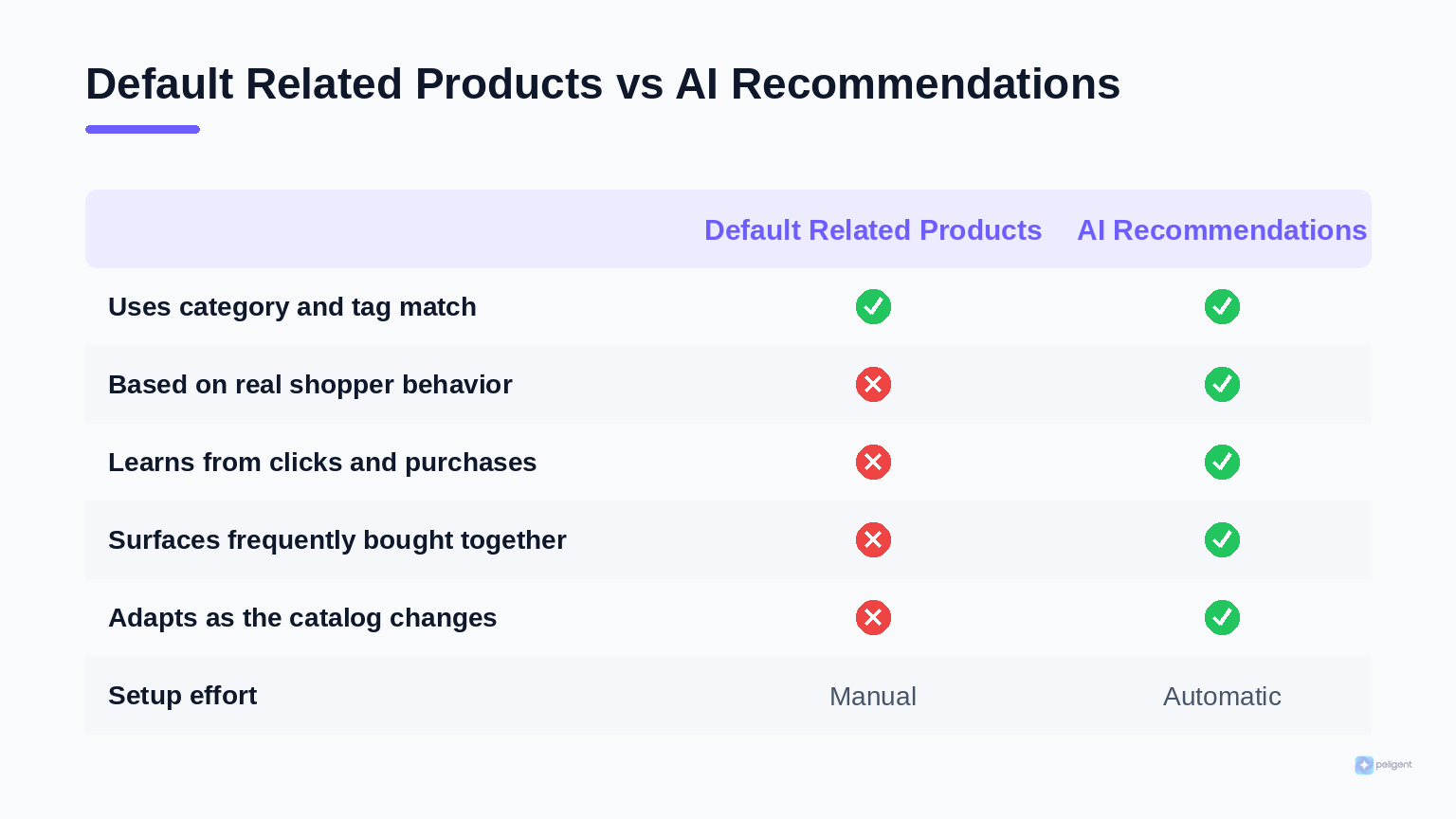
The practical difference shows up in three ways:
- Relevance. AI reacts to what a visitor clicks, ignores, or buys, so the next suggestion is better than the last.
- Freshness. As your catalog and buying patterns change, the engine adjusts on its own instead of showing the same stale row for months.
- Coverage. Good engines still recommend sensible items for brand-new products with little data, by blending behavior signals with product attributes.
Recommendations are the passive, "here is something you might like" side of discovery. The active side is when a shopper types a query and expects an instant, relevant match. That is a different job handled by AI-powered semantic search, and the two work best together: search captures intent, recommendations expand it.
Why do product recommendations matter for revenue?
Product recommendations matter because they influence a share of revenue far larger than the traffic they touch. Across the ecommerce industry, recommendation widgets are frequently credited with driving roughly a quarter to a third of total store revenue, even though the visitors who engage with them are a small slice of the audience. Personalization studies point the same direction: AI-driven personalization is commonly associated with double-digit lifts in conversion rate and average order value, and a meaningful lift in customer lifetime value.
"Product recommendations often generate a large portion of ecommerce revenue while accounting for only a small portion of the traffic. That is leverage most WooCommerce stores leave on the table."
The reason is compounding. A more relevant suggestion raises the odds of a click. A click deepens the session. A deeper session raises the chance of an add-to-cart, and a well-timed "frequently bought together" prompt raises the number of items per order. Each step is a small percentage gain, but stacked across every visit they add up to real money. Recommendations also support retention: a post-purchase "based on what you bought" email gives a reason to return, which pairs naturally with the tactics in our guide to WooCommerce customer retention.
Treat recommendations as one lever in a wider growth system, not a magic switch. They amplify a store that already has clear product data, fast pages, and a clean checkout. For the bigger picture, see our WooCommerce growth tips.
Where should you show recommendations?
You should show recommendations at every stage where a shopper is deciding what to do next, matching the message to the moment. The same engine can serve different goals depending on placement, so think in terms of the journey rather than a single widget.
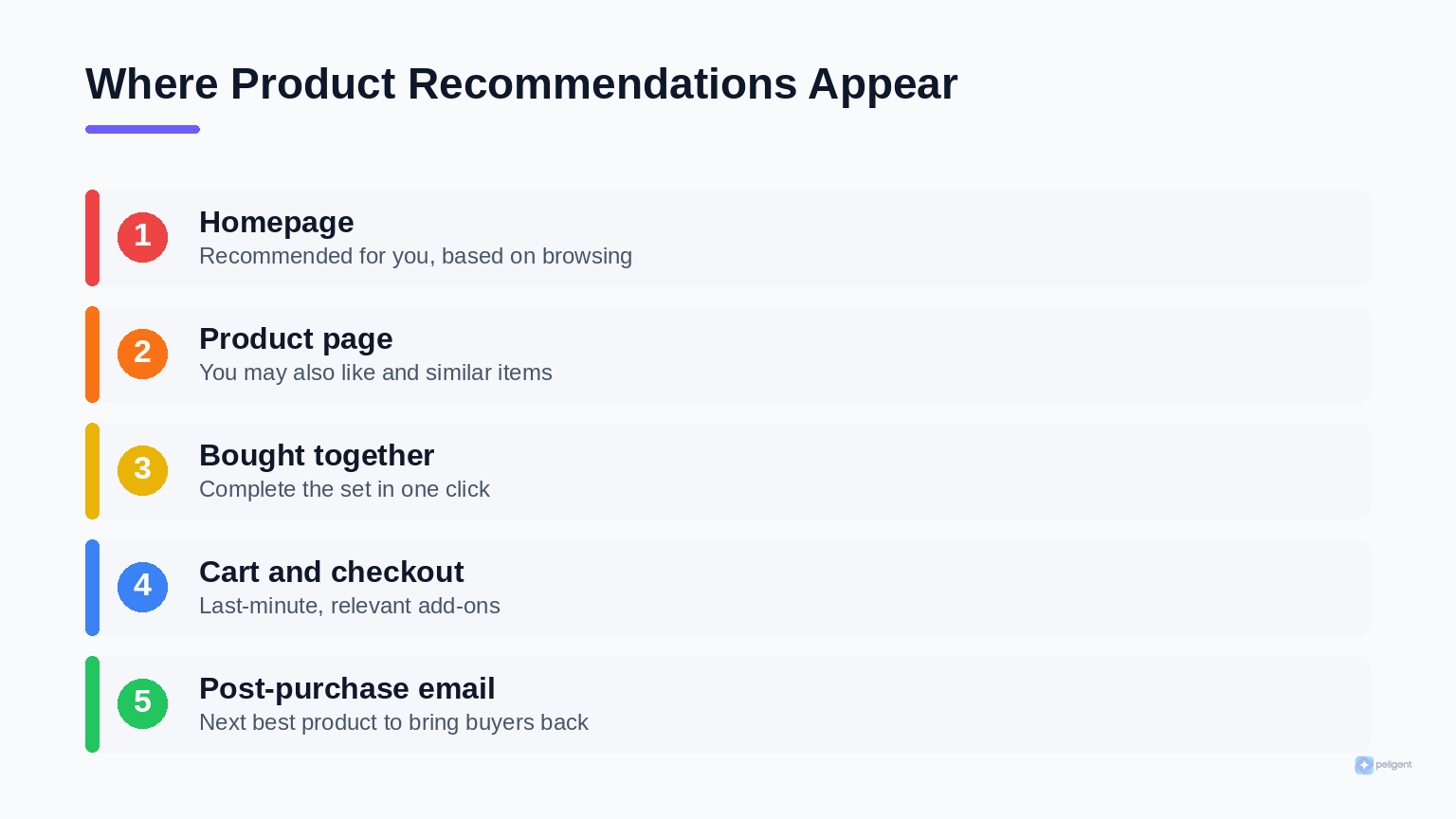
- Homepage. A "Recommended for you" or "Trending now" strip helps returning visitors pick up where they left off and gives new visitors a fast way in.
- Product page. "You may also like" and "Similar items" keep browsing alive when the current product is not quite right.
- Frequently bought together. Near the add-to-cart button, a bundle of items that genuinely sell together lifts order size with almost no friction.
- Cart and checkout. A short, relevant "complete your order" prompt catches last-minute add-ons. Keep it minimal so it never distracts from the purchase.
- Post-purchase email. A "based on what you bought" follow-up brings buyers back and is a strong companion to your cart recovery flow.
A conversational surface counts too. If you run a shopping assistant, it can recommend inside the chat as it answers questions, which is covered in our guide to the WooCommerce AI chatbot.
What types of recommendation engines exist?
There are a few recommendation approaches, and most strong setups combine them rather than picking one. Knowing the differences helps you read plugin feature lists honestly.
Content based (attribute matching)
This recommends products that are similar in their attributes: same category, brand, price band, color, or material. It is stable and works even for new products with no sales history, which is why it is a good fallback. The default WooCommerce related block is a basic version of this.
Behavioral and co-purchase
This looks at how real orders and sessions behave. "Frequently bought together" is the classic example, scoring how often two products appear in the same order. It captures patterns a human would never spot, and it is the workhorse of most effective engines.
Personalized and AI
This tailors suggestions to the individual shopper by combining their behavior with the broader patterns above, often using machine learning. The result adapts in real time to each visit. The strongest tools blend behavioral signals with attribute data so recommendations stay relevant as catalogs and trends change.
Your recommendations are only as smart as your product data.
Peligent is an AI co-pilot for WordPress and WooCommerce that cleans titles, descriptions, categories, and attributes at scale, so every engine has good data to learn from.
How do you set up recommendations in WooCommerce?
You set up recommendations in WooCommerce by choosing an engine, defining the rule that decides what to show, and deploying it to a location on your store. The exact clicks depend on the tool, but the shape is the same across the official extension and third-party plugins.
- Pick your approach. Start with the built-in related products to confirm placement, then move to a dedicated engine when you want behavior-based results.
- Create an engine. In the official WooCommerce Product Recommendations extension you go to WooCommerce, then Recommendations, then Engines, and create a new one. Give it a clear title such as "Frequently Bought Together."
- Add a rule or amplifier. Choose the logic. A "bought together" amplifier ranks items that are commonly purchased in the same order, using a significance score that compares how often two products sell together against how often the candidate sells at all.
- Deploy to a location. Assign the engine to a spot such as the product page or cart, set the number of columns and rows, and deploy.
- Feed it clean data. Make sure titles, categories, tags, and attributes are accurate and consistent. Sparse or messy data produces weak suggestions no matter how good the engine is.
- Measure and iterate. Watch click-through and revenue per placement, then adjust the rule, the position, or the number of items shown.
Step five is where most stores quietly lose. If half your catalog has thin descriptions, duplicated categories, or missing attributes, the engine has little to reason about. Fixing that by hand across hundreds of products is painful, which is exactly the kind of bulk cleanup an AI co-pilot handles. Our guides to writing product descriptions that sell and bulk editing at scale show how to get the underlying data in shape first.
How Peligent helps you recommend smarter
Peligent helps by improving the two things every recommendation engine depends on: clean product data and a clear decision about what to show where. Peligent is an AI co-pilot for WordPress and WooCommerce, and it works on the layer beneath the recommendation widget.
- Enriches product data at scale. It rewrites thin or duplicate descriptions, fills missing attributes, and tidies categories and tags across your whole catalog, so behavior and attribute engines both have more to work with.
- Surfaces the patterns. Its Growth Advisor reads your sales history to highlight which products sell together and which segments respond to which offers, so your "frequently bought together" and "recommended for you" rows are grounded in real data.
- Drafts the surrounding copy. From bundle labels to the post-purchase email that carries your recommendations, Peligent drafts on-brand copy so the suggestion lands well.
The plugin still renders the recommendation. Peligent makes sure the data and decisions behind it are good, which is where most stores fall short. You can see how Peligent works and start cleaning up the catalog that feeds your recommendations.
Frequently asked questions
Does WooCommerce have product recommendations built in?
Yes, but only a basic version. WooCommerce shows related products by matching category and tag, and it supports manual up-sells and cross-sells you set per product. It does not include behavior-based or AI personalization out of the box, so for smarter suggestions you add a dedicated extension or plugin.
Are AI product recommendations worth it for a small store?
Often yes, because the setup is light and the upside compounds. Even simple co-purchase logic usually beats the default related block, and better order size and repeat visits matter just as much for a small catalog. Start with one placement, measure it, and expand once you see lift.
What is the difference between related products and up-sells in WooCommerce?
Related products are chosen automatically by shared category or tag, while up-sells and cross-sells are products you select manually per item. Up-sells point to a better or pricier alternative on the product page, and cross-sells suggest add-ons in the cart. Recommendation engines automate and personalize all of these.
Do product recommendations slow down my store?
A well-built recommendation feature has a minimal performance impact, but a heavy plugin or too many widgets on one page can add load. Keep placements purposeful, choose a lightweight tool, and monitor page speed so recommendations help conversions rather than hurt them.
How many recommendations should I show?
Show enough to spark discovery without overwhelming the decision, usually one focused row of four to six items per placement. On the cart and checkout, keep it even shorter so nothing competes with completing the purchase. Test the count and watch click-through and revenue per placement.
What data do AI recommendations need to work well?
They need accurate product data and enough behavioral history. Clean titles, correct categories and tags, complete attributes, and a steady stream of views and orders all improve results. This is why cleaning your catalog first, ideally with an AI co-pilot, has such a large effect on recommendation quality.
Written by
Wana DaliriAI content writer at Peligent. Covering WordPress, WooCommerce, and AI for e-commerce.
Enjoyed this article?
Subscribe to get more WooCommerce insights delivered to your inbox.
Related Articles
View all
WooCommerce AEO: How to Get Your Products Recommended by AI
Answer engine optimization for WooCommerce: how to get your products cited and recommended by ChatGPT, Perplexity, and Google AI Overviews in 2026.


WooCommerce CSV Import: How to Bulk Upload Products Without the Headaches
A practical 2026 guide to importing WooCommerce products from a CSV file, fixing the errors that break most imports, and cleaning up your catalog with AI.
WooCommerce AI Chatbot: How to Add a Smart Shopping Assistant That Sells (2026)
A practical guide to adding an AI chatbot to your WooCommerce store in 2026: how it works, the features that matter, setup steps, and the best practices that turn chats into sales.