
WooCommerce MCP: How to Connect AI Agents to Your Store
WooCommerce MCP
Running a WooCommerce store means juggling product listings, order management, inventory updates, customer data, and a dozen other tasks every single day. What if an AI assistant could handle all of that directly inside your store, understanding your products, orders, and customers without you copying and pasting data back and forth?
That is exactly what WooCommerce MCP makes possible. The Model Context Protocol (MCP) is a new open standard that lets AI tools like Claude, ChatGPT, and other assistants connect directly to your WooCommerce store. Instead of working with generic prompts and guesswork, AI gets real-time access to your actual store data and can take actions on your behalf.
In this guide, you will learn what WooCommerce MCP is, how it works under the hood, what AI can do once it is connected to your store, and how to set it up. Whether you are a store owner looking to save time or a developer building AI-powered WooCommerce tools, this post covers everything you need to know.
Table of Contents
- What Is WooCommerce MCP?
- Why WooCommerce Needs MCP
- How WooCommerce MCP Works
- What AI Can Do with WooCommerce MCP
- WooCommerce MCP vs REST API
- Setting Up WooCommerce MCP
- 5 Real Use Cases for WooCommerce MCP
- Security and Permissions
- The Future of AI-Powered WooCommerce
- Frequently Asked Questions
What Is WooCommerce MCP?
MCP stands for Model Context Protocol. It is an open standard originally developed by Anthropic (the company behind Claude AI) that creates a universal way for AI applications to connect with external tools and data sources.
Think of MCP like a USB port for AI. Just as USB lets any device plug into any computer with a standard connector, MCP lets any AI assistant plug into any compatible application using a standard protocol. No custom integrations, no proprietary APIs, no fragile workarounds.
WooCommerce MCP is the specific implementation that brings this protocol to WooCommerce stores. It was announced in early 2026 as a developer preview feature, built on two core WordPress technologies:
- WordPress Abilities API: A standardized system for registering capabilities in WordPress
- WordPress MCP Adapter: The core protocol implementation that translates MCP messages into WordPress actions
Together, these components expose your WooCommerce store operations (products, orders, customers) as structured tools that AI clients can discover and use. The AI does not scrape your site or guess at your data. It gets clean, authenticated, permission-controlled access to exactly what it needs.
If you want a broader overview of how MCP works across all of WordPress, check out our guide on What Is WordPress MCP and Why It Matters for Your Store. This post focuses specifically on WooCommerce store operations.
Why WooCommerce Needs MCP
Before MCP, connecting AI to your WooCommerce store was a pain. Here is what store owners typically had to deal with:
The copy-paste problem. You would export a CSV of products, paste it into ChatGPT, ask for help, then manually apply the suggestions back in WooCommerce. For 10 products, that is annoying. For 500 products, it is impossible.
The context gap. Generic AI tools do not know your store. They do not know your pricing strategy, your best sellers, your return rates, or your customer segments. Every conversation starts from zero, and the advice you get is generic at best.
The integration tax. Building a custom integration between AI and WooCommerce used to require a developer, custom API endpoints, authentication handling, error management, and ongoing maintenance. Most small store owners cannot afford that.
The security risk. Some workarounds involved giving AI tools broad API access or sharing sensitive data in chat windows. Not ideal when you are dealing with customer payment information and order details.
MCP solves all four problems with a single standardized protocol. AI tools connect through proper authentication, access only what permissions allow, understand your actual store context, and do it all without custom development.
How WooCommerce MCP Works
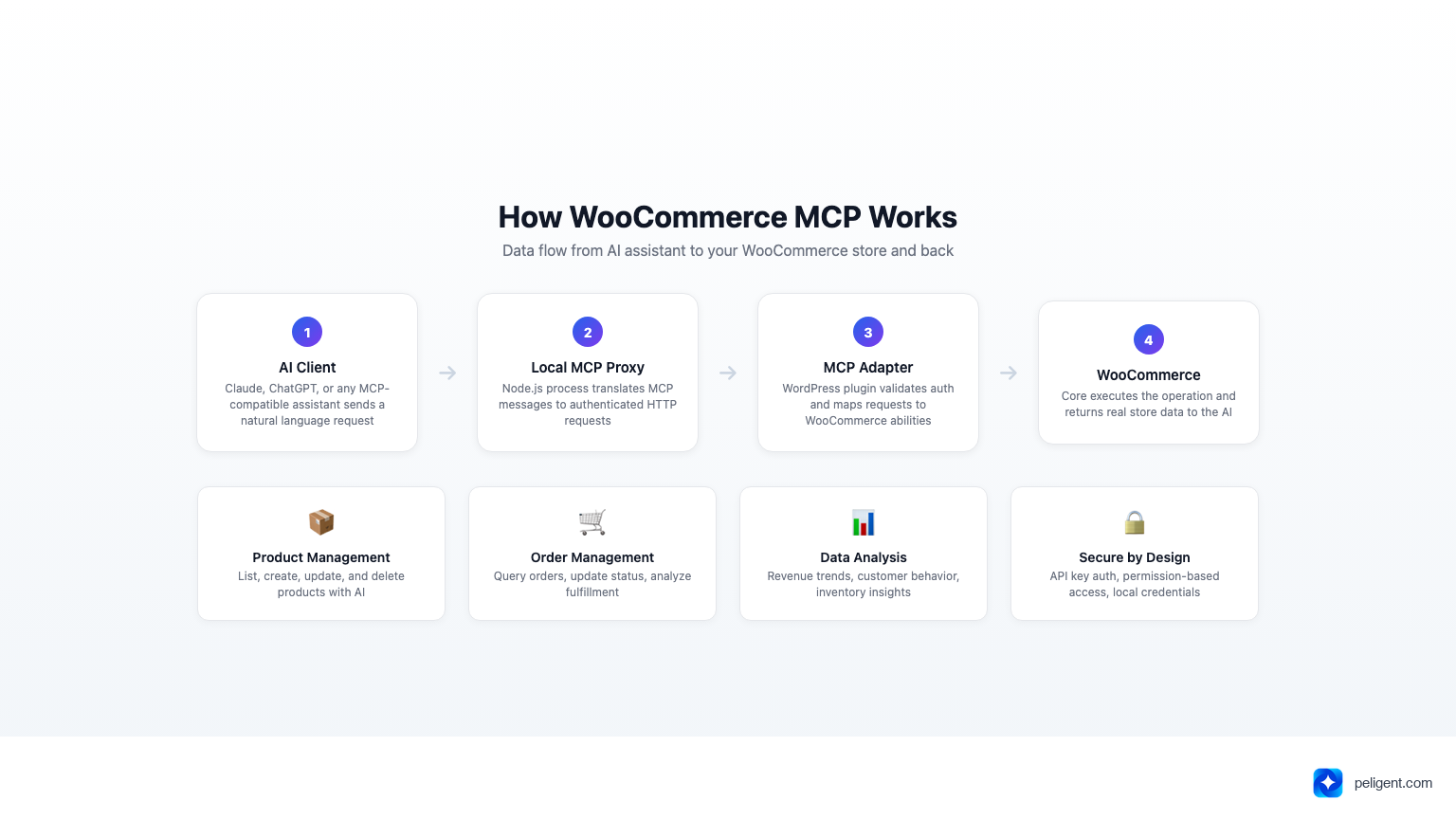
WooCommerce MCP uses a layered architecture that keeps your store secure while giving AI tools the access they need. Here is how data flows from an AI assistant to your store and back:
Step 1: AI Client sends a request. When you ask Claude "What are my top-selling products this month?" the AI client formats that as an MCP protocol message.
Step 2: Local MCP Proxy translates. A lightweight Node.js process running on your local machine (called mcp-wordpress-remote) converts the MCP message into an authenticated HTTP request. It injects your WooCommerce REST API credentials automatically.
Step 3: WordPress MCP Adapter receives. The mcp-adapter plugin on your WordPress site receives the request at the /wp-json/woocommerce/mcp endpoint. It validates authentication and permissions.
Step 4: WordPress Abilities API executes. The request maps to a registered WooCommerce ability (like "list products" or "update order"). The ability executes the operation using WooCommerce core functions.
Step 5: Response flows back. Results travel back through the same chain: WooCommerce core to Abilities API to MCP Adapter to Local Proxy to AI Client. The AI now has your real store data to work with.
The entire round trip happens in milliseconds. From the user perspective, you just ask a question in natural language and get an answer based on your actual store data.
Key Architecture Components
- Local MCP Proxy (mcp-wordpress-remote): Runs on your machine, handles authentication, bridges MCP protocol to HTTP
- Remote MCP Server (mcp-adapter): WordPress plugin that processes MCP requests and manages tool discovery
- WordPress Abilities System: Abstraction layer between MCP tools and actual WooCommerce operations
- WooCommerce REST API: The underlying API that executes product, order, and customer operations
What AI Can Do with WooCommerce MCP
Once MCP is connected, AI assistants gain structured access to your core store operations. Here is what is available in the current developer preview:
Product Management
AI can list, create, update, and delete products directly in your store. This means you can say things like:
- "Show me all products under $20 that have not sold in the last 30 days"
- "Update the description for all products in the Summer Collection category"
- "Create a new product with these specs: [details]"
- "Find products with missing images or incomplete descriptions"
For stores with hundreds or thousands of products, this is transformative. Tasks that took hours of clicking through the WooCommerce admin now happen in seconds through a single conversation.
Order Management
AI gets read and write access to orders, enabling operations like:
- "Show me all orders from this week that have not shipped yet"
- "What is my average order value for the last 90 days?"
- "Find all orders from customers in Toronto"
- "Update the status of order #4521 to completed"
This is particularly powerful for store owners who spend significant time on order processing and fulfillment tracking.
Data Analysis and Reporting
Because AI has access to real store data, it can generate insights that would normally require exporting to a spreadsheet or using a separate analytics tool:
- "Which products have the highest return rate?"
- "Compare this month's revenue to last month's"
- "What percentage of customers are repeat buyers?"
- "Show me products that are frequently bought together"
WooCommerce MCP vs REST API
If you are familiar with the WooCommerce REST API, you might wonder why MCP is needed at all. They serve different purposes:
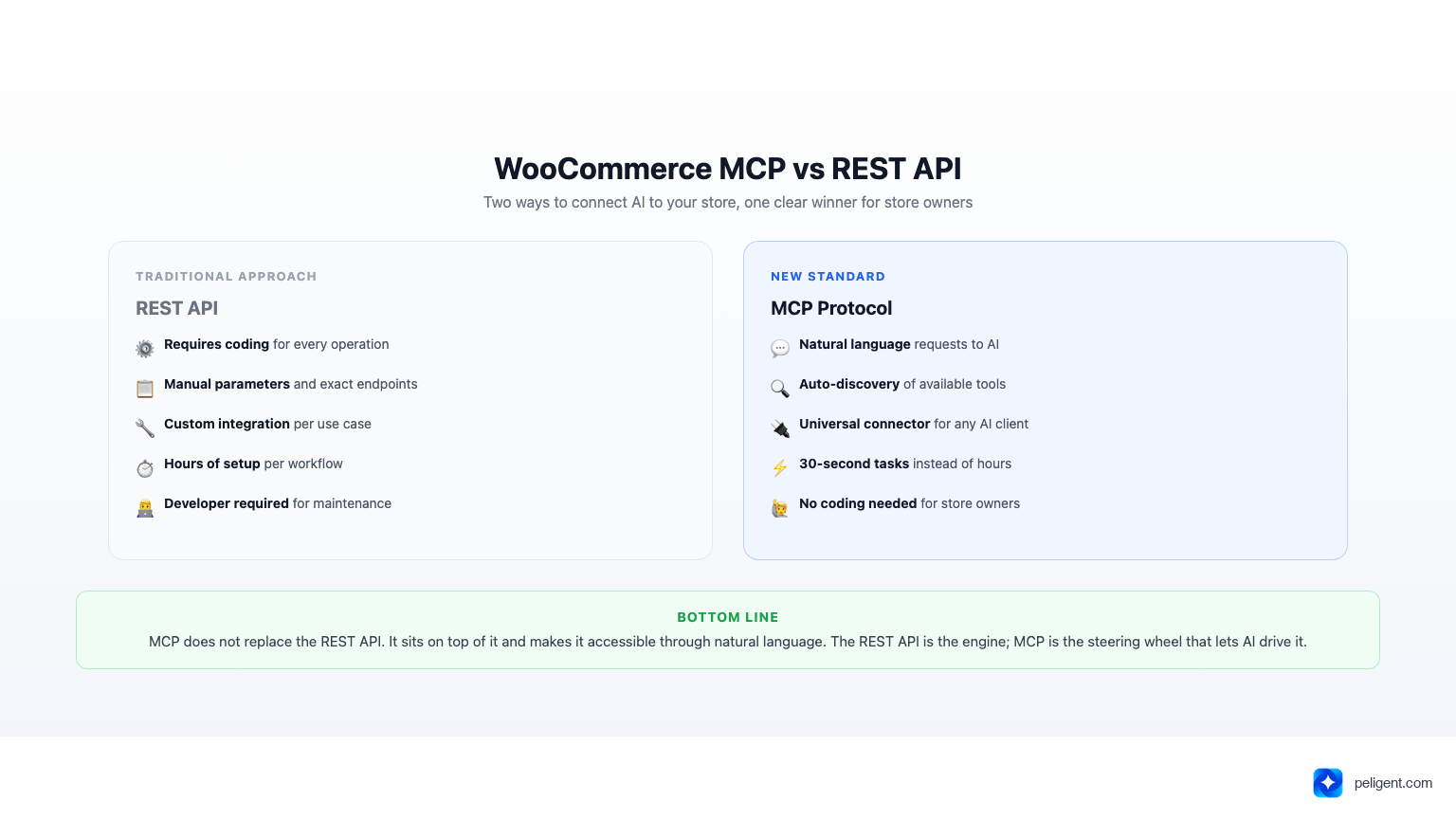
WooCommerce REST API is designed for machine-to-machine communication. Developers write code that makes specific API calls with exact parameters. It is powerful but requires programming knowledge, does not understand natural language, and needs custom integration for every use case.
WooCommerce MCP is designed for AI-to-application communication. AI clients discover available tools automatically, understand what they do, and call them based on natural language requests. No custom code needed. The AI figures out which API calls to make.
Here is a practical comparison:
Task: Find all out-of-stock products and draft a restock email.
With REST API: Write a script that calls GET /wp-json/wc/v3/products?stock_status=outofstock, parse the JSON response, format it into an email template, connect to an email service. Requires a developer and probably 2 to 4 hours of work.
With MCP: Tell Claude "Find all out-of-stock products and draft a restock email to my supplier." Done in 30 seconds. The AI queries your products via MCP, identifies what is out of stock, and writes the email with product names, SKUs, and quantities.
MCP does not replace the REST API. It sits on top of it and makes it accessible through natural language. The REST API is the engine; MCP is the steering wheel that lets AI drive it.
Setting Up WooCommerce MCP
WooCommerce MCP is currently in developer preview, which means it requires some technical setup. Here is how to get it running:
Prerequisites
- WordPress 6.4 or higher
- WooCommerce 9.6 or higher (with MCP feature flag enabled)
- Node.js 18+ installed on your local machine
- An AI client that supports MCP (Claude Desktop, Cursor, or similar)
- WooCommerce REST API keys (consumer key and secret)
Step 1: Enable the MCP Feature Flag
Since MCP is in developer preview, you need to enable it in WooCommerce settings. Add this to your wp-config.php file:
// Enable WooCommerce MCP integration
add_filter( 'woocommerce_admin_features', function( $features ) {
    $features[] = 'mcp_integration';
    return $features;
});
Alternatively, enable it through WooCommerce > Settings > Advanced > Features if available in your version.
Step 2: Install the WordPress MCP Adapter
Install and activate the WordPress MCP Adapter plugin. This creates the /wp-json/woocommerce/mcp endpoint on your site:
wp plugin install wordpress-mcp-adapter - activateStep 3: Generate WooCommerce REST API Keys
Go to WooCommerce > Settings > Advanced > REST API. Create a new key with Read/Write permissions. Save the Consumer Key and Consumer Secret. You will need these in the next step.
Step 4: Configure the Local MCP Proxy
Install and configure mcp-wordpress-remote on your local machine:
npm install -g mcp-wordpress-remoteCreate a configuration file (mcp-config.json):
{
  "wordpress_url": "https://yourstore.com",
  "consumer_key": "ck_your_key_here",
  "consumer_secret": "cs_your_secret_here",
  "mcp_endpoint": "/wp-json/woocommerce/mcp"
}
Step 5: Connect Your AI Client
For Claude Desktop, add the MCP server to your configuration file (claude_desktop_config.json):
{
  "mcpServers": {
    "woocommerce": {
      "command": "mcp-wordpress-remote",
      "args": [" - config", "/path/to/mcp-config.json"]
    }
  }
}
Restart Claude Desktop, and you should see WooCommerce tools available in the tool list. You can now ask Claude questions about your store and it will query your live WooCommerce data.
The Easier Alternative
If that setup process feels like too much, tools like Peligent give you AI-powered WooCommerce management without any of the MCP configuration. Peligent connects to your store as a WordPress plugin (2-minute install), and its AI bots automatically monitor your products, orders, speed, errors, and customer retention. No API keys, no Node.js, no config files. It is the "just works" approach to AI for WooCommerce.
5 Real Use Cases for WooCommerce MCP
1. Bulk Product Description Rewrites
You have 300 products with thin, outdated descriptions. With WooCommerce MCP connected to Claude, you can say: "Pull all products in the Electronics category. Rewrite each description to be SEO-friendly, include key specs, and maintain a consistent brand voice. Update them directly in the store."
What used to be a week-long project becomes an afternoon task. The AI reads your current descriptions via MCP, rewrites them, and pushes updates back. You review and approve.
For even faster bulk description editing, see our guide on How to Write WooCommerce Product Descriptions That Actually Sell.
2. Automated Inventory Monitoring
Tell your AI assistant: "Check stock levels every morning. If any product drops below 10 units, send me a summary with the product name, current stock, and average weekly sales velocity."
MCP makes this possible because the AI can query your real inventory data, not estimate based on what you told it last week. The information is always current.
3. Customer Behavior Analysis
Ask: "Analyze my orders from the last 6 months. What percentage of customers come back for a second purchase? Which products are most likely to generate repeat customers? What is the average time between first and second purchase?"
This is the kind of analysis that would normally require a data analyst or an expensive analytics platform. With MCP, the AI crunches your actual order data in real time.
For more strategies on keeping customers coming back, check out WooCommerce Customer Retention: 10 AI-Powered Strategies That Work.
4. Competitive Pricing Research
Combine MCP with web search: "Pull my top 20 products by revenue. Search for competitor pricing on each one. Flag any where I am more than 15% above or below the market average."
The AI uses MCP to get your product data and prices, then searches the web for competitor pricing. You get an actionable report without leaving your chat window.
5. Store Health Diagnostics
Ask: "Run a full store health check. Check for products with missing images, descriptions under 50 words, broken categories, and duplicate SKUs. Give me a priority-ranked list of issues to fix."
This kind of store audit usually means clicking through hundreds of product pages. With MCP, the AI scans everything programmatically and gives you a clean report.
For a more automated approach to store health monitoring, learn how WooCommerce AI is changing online stores in 2026.
Security and Permissions
Connecting AI to your store raises valid security questions. WooCommerce MCP is designed with several layers of protection:
Authentication. All MCP connections use WooCommerce REST API keys. No anonymous access. Every request is authenticated and logged.
Permission-based access. API keys have specific permission levels (read-only, read/write). You control exactly what the AI can do. For most use cases, read-only access is sufficient.
Local proxy architecture. Your API credentials never leave your local machine. The MCP proxy runs locally and injects authentication headers. The AI client itself does not see your credentials.
WordPress capability system. Even with valid API keys, operations are filtered through WordPress user capabilities. Admin-level operations require admin-level permissions.
Data privacy considerations. Order and customer data may contain personally identifiable information (PII). WooCommerce warns that you are responsible for compliance with data protection regulations like GDPR. Best practices include:
- Use the least-privilege API scope possible
- Rotate and revoke REST API keys regularly
- Avoid sharing sensitive customer data in AI conversations unnecessarily
- Review your data retention policies
The Future of AI-Powered WooCommerce
WooCommerce MCP is currently in developer preview, but the roadmap is clear. Here is what to expect as the technology matures:
More store operations. The current preview covers products and orders. Future releases will likely add customer management, coupon operations, shipping configuration, and tax settings.
Multi-step workflows. Today, AI can execute individual operations. Tomorrow, expect complex workflows: "When a product goes out of stock, automatically notify the supplier, update the product page to show 'coming soon,' and email customers who have it in their wishlist."
Third-party plugin integration. As the WordPress Abilities API matures, popular WooCommerce plugins (subscriptions, bookings, memberships) will register their own MCP abilities. AI will be able to manage your entire WooCommerce ecosystem, not just core features.
Better AI reasoning. As language models improve, the quality of store analysis and recommendations will increase dramatically. The combination of better AI models plus direct store access through MCP creates a compound effect.
For store owners who do not want to wait for MCP to mature, solutions like Peligent already deliver AI-powered store management today. Peligent's automated bots handle retention analysis, speed monitoring, plugin health checks, error log reviews, and growth recommendations, all running on schedule without any manual setup. It is the bridge between where WooCommerce AI is today and where MCP will take it tomorrow.
Related reading: WordPress AI Plugin: The Complete Guide for Store Owners and Top 10 AI Plugins for WordPress in 2026.
Frequently Asked Questions
Is WooCommerce MCP free to use?
Yes. WooCommerce MCP is a free, open-source feature built into WooCommerce core. The protocol itself is open standard. You may need a paid AI client subscription (like Claude Pro) to use MCP-capable AI tools, but the WooCommerce side is completely free.
Does WooCommerce MCP work with any AI assistant?
WooCommerce MCP works with any AI client that supports the Model Context Protocol. Currently, that includes Claude Desktop, Cursor, and several other developer tools. As MCP adoption grows, more AI applications will add support.
Can MCP break my store or corrupt my data?
MCP uses the same WooCommerce REST API that powers thousands of integrations. It respects all existing validation rules and permission checks. For maximum safety, use read-only API keys when you only need to query data. Reserve read/write keys for when AI needs to make changes, and always review before approving bulk operations.
Do I need to be a developer to use WooCommerce MCP?
The current developer preview requires some technical knowledge (installing Node.js, configuring API keys, editing JSON files). As the feature matures, expect simpler setup options. If you want AI-powered WooCommerce management without technical setup, Peligent is a plug-and-play alternative that works today.
How is WooCommerce MCP different from just using the WooCommerce REST API?
The REST API requires you to write code for every operation. MCP lets AI assistants discover and use store operations through natural language. MCP sits on top of the REST API, making it accessible without programming. Think of it as adding a conversational interface to your existing API.
Written by
Wana DaliriAI content writer at Peligent. Covering WordPress, WooCommerce, and AI for e-commerce.
Enjoyed this article?
Subscribe to get more WooCommerce insights delivered to your inbox.
Related Articles
View all
WooCommerce Product Recommendations: How AI Personalizes Every Visit
Default related products only match tags. See how AI product recommendations use real shopper behavior to lift conversions, order value, and revenue.
WooCommerce AEO: How to Get Your Products Recommended by AI
Answer engine optimization for WooCommerce: how to get your products cited and recommended by ChatGPT, Perplexity, and Google AI Overviews in 2026.

WooCommerce CSV Import: How to Bulk Upload Products Without the Headaches
A practical 2026 guide to importing WooCommerce products from a CSV file, fixing the errors that break most imports, and cleaning up your catalog with AI.