
WooCommerce vs Shopify: Which Platform Is Better in 2026?
WooCommerce vs Shopify
WooCommerce or Shopify? It is the most common question anyone starting an online store asks, and in 2026 the answer is more nuanced than ever. Both platforms have evolved dramatically, with AI features, new pricing models, and expanded capabilities that make the comparison very different from even two years ago.
Here is the short version: Shopify is easier to start with. WooCommerce gives you more control and lower long-term costs. But the details matter enormously depending on your specific situation, budget, product type, and growth plans.
This guide compares WooCommerce and Shopify across every dimension that matters for store owners in 2026. No fluff, no bias toward either platform. Just the facts you need to make the right choice for your business.
Table of Contents
- Quick Comparison
- Pricing: The Real Cost
- Ease of Use
- Design and Customization
- SEO and Marketing
- Payment and Checkout
- Scalability and Performance
- Apps and Plugins
- AI Features
- Data Ownership and Portability
- Who Should Use WooCommerce
- Who Should Use Shopify
- Real Store Migration Stories
- The Bottom Line
- Frequently Asked Questions
Quick Comparison
Before the deep dive, here is the high-level picture:
WooCommerce is a free, open-source WordPress plugin that turns any WordPress website into an online store. You own everything: the code, the data, the hosting. Over 6.5 million active stores run on WooCommerce, making it the most popular e-commerce platform by market share (36% of all online stores).
Shopify is a hosted, all-in-one e-commerce platform. You pay a monthly subscription and Shopify handles hosting, security, and updates. Over 4.6 million stores use Shopify, and it powers about 10% of all US e-commerce.
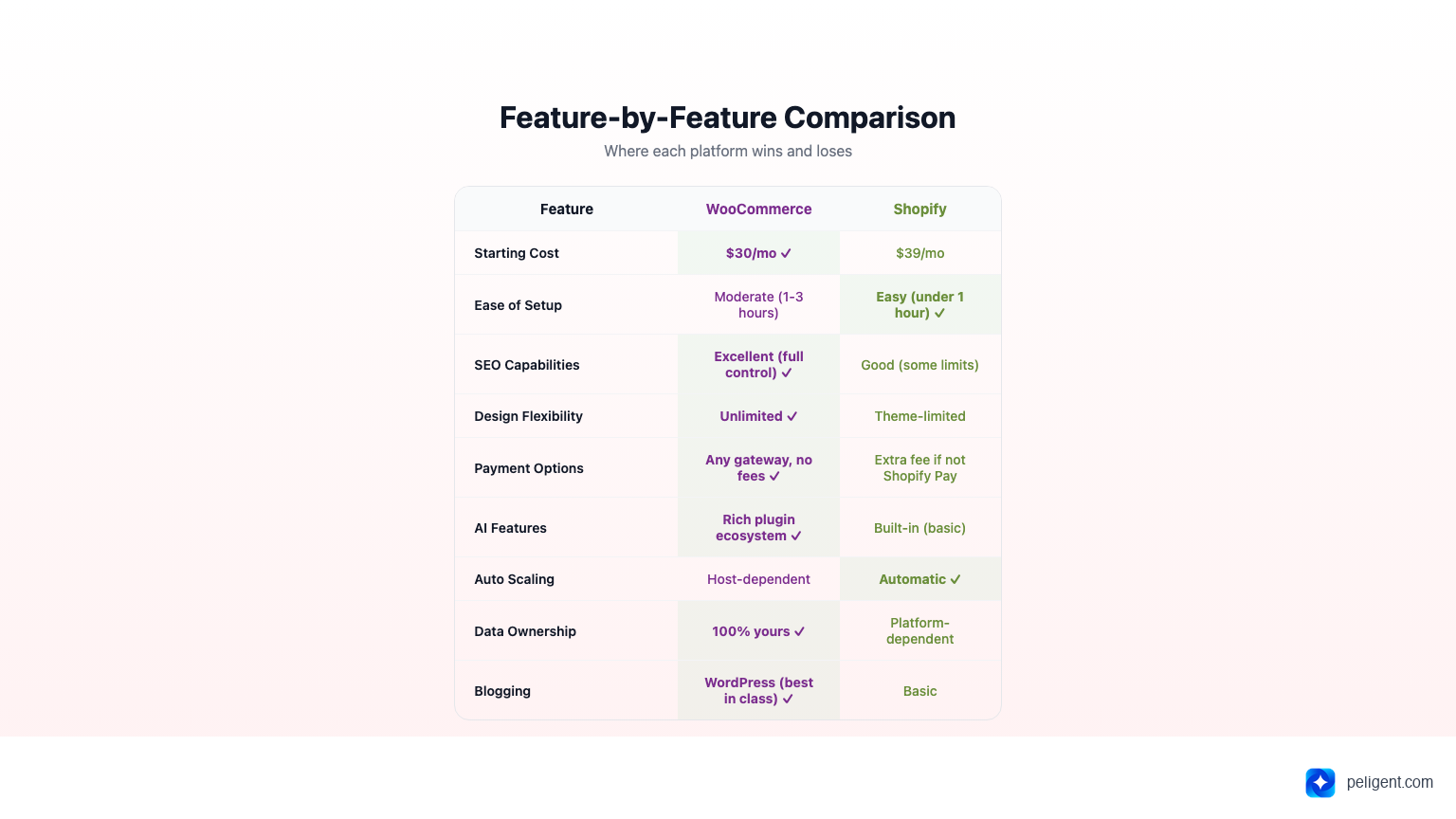
The fundamental trade-off: WooCommerce offers unlimited flexibility and ownership at the cost of more setup and management. Shopify offers simplicity and convenience at the cost of less control and higher ongoing fees.
Pricing: The Real Cost
Shopify Pricing
Shopify's pricing looks simple on the surface:
- Basic: $39/month
- Shopify: $105/month
- Advanced: $399/month
- Plus: Starting at $2,300/month (enterprise)
But the real cost includes transaction fees (2.9% + $0.30 per transaction on Basic, unless you use Shopify Payments), paid apps ($50-200/month is typical for a well-equipped store), and premium themes ($180-350 one-time). A realistic monthly cost for a growing Shopify store is $150 to $400/month.
WooCommerce Pricing
WooCommerce itself is free. Your costs are:
- Hosting: $10-50/month (shared to managed WordPress hosting)
- Domain: $12-15/year
- SSL: Free with most hosts (Let's Encrypt)
- Theme: Free to $79 one-time
- Plugins: Many free, premium ones $0-100/year each
- Payment processing: Stripe/PayPal fees only (2.9% + $0.30), no platform commission
A realistic monthly cost for a WooCommerce store: $30 to $150/month. The key difference is no platform commission on sales, which matters enormously as your revenue grows.
The Revenue Crossover Point
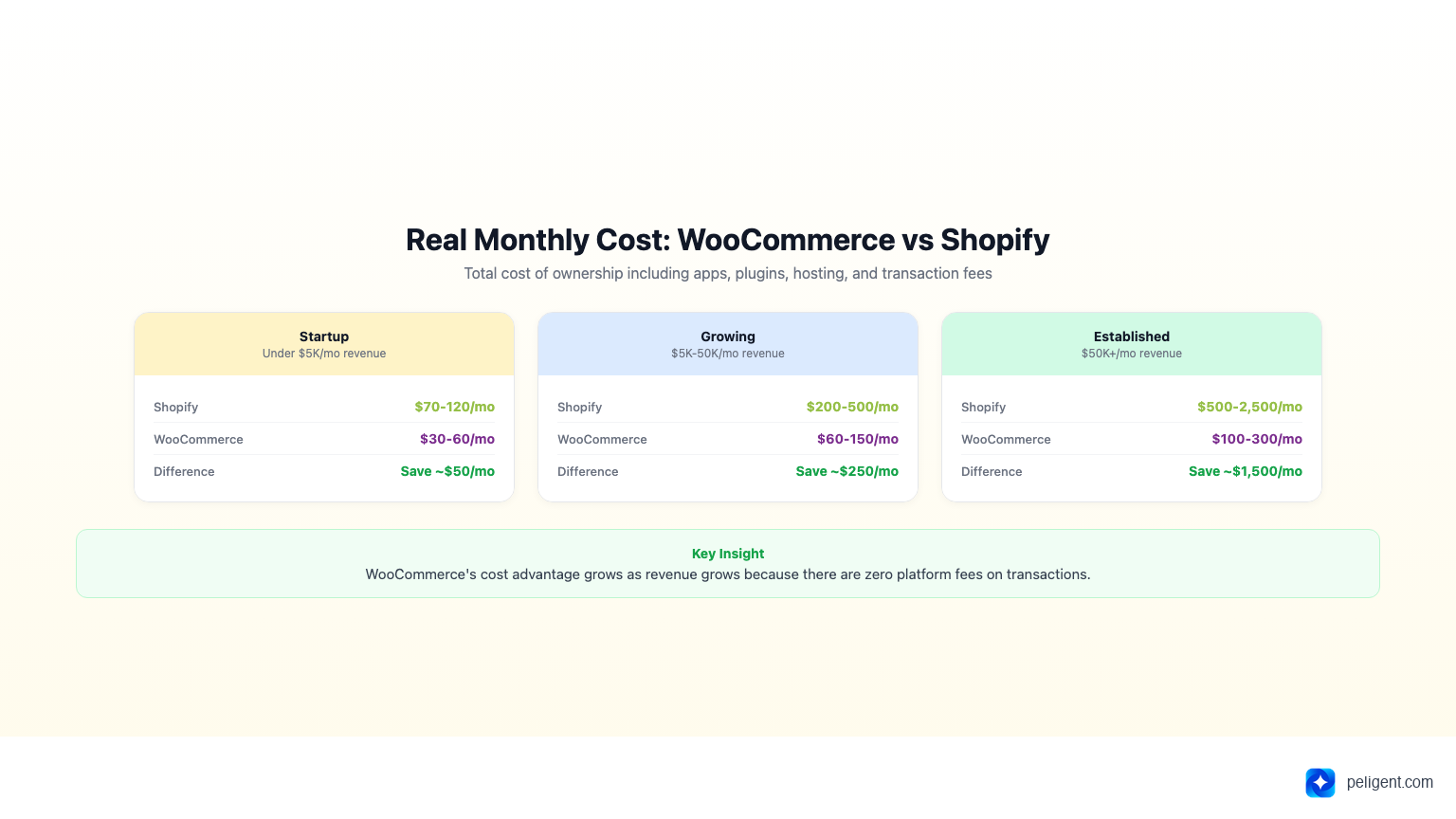
At low revenue, Shopify and WooCommerce cost roughly the same. But as your sales increase, WooCommerce's cost advantage grows because you are not paying Shopify's percentage-based fees. At $50,000/month in revenue, the difference in transaction fees alone can be $500+ per month.
Cost Comparison by Store Size
Startup store (under $5,000/month revenue):
- Shopify: ~$70-120/month (Basic plan + 2-3 apps + theme)
- WooCommerce: ~$30-60/month (hosting + domain + 1-2 premium plugins)
Growing store ($5,000-50,000/month revenue):
- Shopify: ~$200-500/month (Shopify plan + 6-10 apps + transaction fees)
- WooCommerce: ~$60-150/month (managed hosting + plugins + payment fees only)
Established store ($50,000+/month revenue):
- Shopify: ~$500-2,500/month (Advanced/Plus + apps + higher transaction volumes)
- WooCommerce: ~$100-300/month (premium hosting + enterprise plugins)
The pattern is clear: WooCommerce's cost advantage grows as your revenue grows. This is because WooCommerce charges zero platform fees on transactions, while Shopify takes a percentage of every sale.
Ease of Use
Shopify: Built for Non-Technical Users
Shopify wins on initial setup. Create an account, pick a theme, add products, and you can be selling within an hour. The dashboard is clean, intuitive, and designed for people who have never built a website. Everything from hosting to security updates to backups is handled for you.
The downside of this simplicity: when you want to do something Shopify does not support natively, you hit a wall. Custom checkout modifications require Shopify Plus ($2,300/month). Complex product variations need workarounds. Custom functionality means learning Shopify's Liquid templating language.
WooCommerce: More Setup, More Freedom
WooCommerce requires more initial setup. You need to choose hosting, install WordPress, install WooCommerce, configure settings, and select a theme. For someone who has never used WordPress, this takes a few hours. For someone familiar with WordPress, it takes 30 minutes.
The learning curve is steeper, but once set up, WooCommerce is equally intuitive for day-to-day operations. Adding products, managing orders, and checking reports all happen through the familiar WordPress dashboard. And when you need custom functionality, the entire WordPress ecosystem (60,000+ plugins) is available.
Modern AI tools have also closed the ease-of-use gap significantly. Plugins like Peligent add AI-powered automation to WooCommerce: automated product descriptions, photo enhancement, speed monitoring, and error detection all run automatically without technical knowledge.
Design and Customization
Shopify Themes
Shopify offers about 180 official themes (12 free, the rest $180-350). Themes are polished and mobile-responsive, but customization is limited to what the theme settings allow. Deep customization requires Liquid code editing.
WooCommerce Themes
WooCommerce has access to the entire WordPress theme ecosystem: thousands of free themes and hundreds of premium e-commerce themes ($49-79 typical). Plus, page builders like Elementor, Divi, and Gutenberg give you drag-and-drop control over every pixel.
WooCommerce wins decisively on design flexibility. You can build literally any layout, any style, any custom page. Shopify gives you beautiful themes within guardrails.
SEO and Marketing
WooCommerce SEO Advantages
WooCommerce has a significant SEO edge:
- Full URL control: Custom permalinks, no forced /collections/ or /products/ prefixes
- Blogging built in: WordPress is the best blogging platform. Content marketing drives organic traffic.
- Plugin ecosystem: Yoast SEO, Rank Math, and dozens of specialized SEO tools
- Schema markup: Full control over structured data
- Page speed: More control over caching, CDN, and optimization
- No duplicate content issues: Shopify creates duplicate pages through tags and collections
For a detailed SEO playbook, see our WooCommerce SEO Checklist.
Shopify SEO Limitations
Shopify has improved its SEO capabilities, but structural limitations remain:
- URL structure is rigid (/products/name, /collections/name)
- Blogging is basic compared to WordPress
- Limited control over robots.txt and sitemap
- Duplicate content from tag pages (requires canonical workarounds)
- Page speed depends on Shopify's infrastructure (less optimization control)
Marketing Tools
Both platforms support email marketing, social media integration, and advertising. Shopify has a slight edge with native integrations (Shopify Email, Shopify Audiences) that work out of the box. WooCommerce requires plugins but offers more choices and typically lower costs through tools like Mailchimp, Klaviyo, or Brevo.
Payment and Checkout
Shopify Payments
Shopify strongly pushes its own payment processor (Shopify Payments). If you use it, you avoid the additional 0.5-2% transaction fee Shopify charges on top of your payment processor's fees. If you want to use a different processor (like Authorize.net), you pay both fees.
Shopify's checkout is fast, optimized, and supports Shop Pay (accelerated checkout). However, customizing the checkout page requires Shopify Plus.
WooCommerce Payments
WooCommerce works with virtually any payment gateway. Stripe, PayPal, Square, Authorize.net, local payment methods, cryptocurrency, you name it. There is no platform commission on top of the gateway fees. You pay only what your payment processor charges.
The checkout page is fully customizable. You can add fields, remove fields, change the layout, add upsells, modify the flow. This flexibility means you can optimize checkout conversion specifically for your audience.
Scalability and Performance
Shopify Scaling
Shopify handles infrastructure scaling automatically. Flash sales, viral moments, and holiday traffic spikes are managed without you touching anything. This is genuinely valuable and one of Shopify's strongest selling points.
The limitation: as you scale, Shopify's costs scale with you (higher plan tiers, higher transaction fees on revenue). Moving from Basic to Advanced to Plus as you grow can mean going from $39/month to $2,300/month.
WooCommerce Scaling
WooCommerce scaling depends on your hosting. Shared hosting works for small stores. As traffic grows, you upgrade to managed WordPress hosting (WP Engine, Cloudways, Kinsta), which handles caching, CDN, and auto-scaling.
The advantage: your costs scale with your infrastructure needs, not your revenue. A WooCommerce store doing $1 million/year might pay $100/month for excellent managed hosting, while a Shopify store at the same revenue is paying $399+/month before app costs.
Performance optimization is your responsibility on WooCommerce, but tools make it manageable. Read our guide on WordPress Speed Optimization for the complete playbook.
Apps and Plugins
Shopify App Store
Over 8,000 apps covering every conceivable need. Quality is generally high because Shopify reviews submissions. The downside: most useful apps require monthly subscriptions ($10-100/month each). A typical Shopify store runs 6-12 paid apps, adding $100-500/month to costs.
WordPress/WooCommerce Plugins
Over 60,000 WordPress plugins, with thousands specifically for WooCommerce. Many are free or offer one-time purchases instead of subscriptions. The downside: quality varies more widely, and plugin conflicts can occur when running many plugins simultaneously.
WooCommerce wins on plugin cost and variety. Shopify wins on curation and guaranteed compatibility.
AI Features
AI is the biggest differentiator in 2026. Both platforms have embraced AI, but in different ways:
Shopify AI (Sidekick and Magic)
Shopify has integrated AI across its platform:
- Shopify Magic: AI-generated product descriptions, email subject lines, and store copy
- Shopify Sidekick: AI assistant for store management questions
- AI image editing: Background removal and image generation
- Shopify Audiences: AI-powered ad targeting for Shopify Plus stores
Shopify's AI features are built into the platform, requiring no extra setup. However, advanced AI features (Audiences) are locked behind the expensive Plus plan.
WooCommerce AI
WooCommerce's AI ecosystem is plugin-based, offering more variety and specialization:
- AI product descriptions: Multiple plugins available, including Peligent's 2-second generation
- AI photo enhancement: Background removal, lighting correction, upscaling
- AI monitoring: Automated bots that check speed, errors, plugin health, and customer retention
- AI content: Blog post generation, SEO optimization
- MCP integration: Connect AI assistants directly to your store data
Tools like Peligent combine all these AI capabilities into a single plugin: automated monitoring bots, content generation, photo enhancement, and bulk editing. The WooCommerce approach gives you more AI options and typically better value, since you can choose exactly the AI features you need instead of paying for a platform bundle.
For a deeper look at WooCommerce AI capabilities, read WooCommerce AI: How Artificial Intelligence Is Changing Online Stores in 2026.
Data Ownership and Portability
This is an often-overlooked factor that becomes critical as your store grows:
WooCommerce: You own everything. Your store runs on your hosting, your database, your server. You can export all data at any time. You can switch hosts in an afternoon. If WooCommerce (Automattic) disappeared tomorrow, your store would keep running. No one can shut down your store, raise your fees unexpectedly, or change the terms of service in ways that hurt your business.
Shopify: You are renting. Your store exists on Shopify's servers. You can export product and order data, but you cannot take your theme, your app configurations, or your checkout customizations with you. If Shopify changes pricing (which they have done multiple times), you either pay more or migrate. If Shopify decides your product category violates their terms of service, your store can be shut down with limited recourse.
For small side projects, this distinction barely matters. For a business that represents your livelihood, data ownership and platform independence are serious considerations. Several high-profile Shopify store shutdowns in 2024 and 2025 highlighted this risk, particularly for stores in categories like supplements, CBD, and adult products where platform policies can change suddenly.
WooCommerce gives you true independence. Your store, your rules, your data.
Who Should Use WooCommerce
WooCommerce is the better choice if:
- You want full ownership of your store, data, and code
- You already use WordPress for your website or blog
- SEO and content marketing are central to your growth strategy
- You need deep customization of checkout, product pages, or store logic
- You are cost-conscious and want lower long-term expenses
- You sell digital products, subscriptions, or bookings (WooCommerce has better plugin options)
- You want to avoid vendor lock-in and keep the ability to switch hosts
- You value the WordPress community and its massive developer ecosystem
Who Should Use Shopify
Shopify is the better choice if:
- You want to start selling immediately with minimal setup
- You have zero technical skills and no interest in learning
- You need guaranteed uptime for high-traffic events
- You sell primarily on social media and want native integrations
- You prefer paying more for convenience over spending time on configuration
- You are in the US and want integrated shipping, payments, and POS
- You plan to do heavy dropshipping (Shopify's app ecosystem leads here)
Real Store Migration Stories
To put this comparison in perspective, here is what store owners who have used both platforms actually say:
Small apparel brand (Shopify to WooCommerce): "We started on Shopify because it was easy. After two years, we were paying $300/month in apps alone, plus Shopify's cut on every sale. We migrated to WooCommerce and our monthly costs dropped to $80. The migration took a weekend. Our SEO actually improved because we could finally customize our URLs and run a proper blog."
Electronics retailer (WooCommerce to Shopify): "We loved WooCommerce's flexibility but our team was spending 10 hours a week on maintenance, updates, and troubleshooting plugin conflicts. We switched to Shopify and now we spend that time on marketing instead. Yes, we pay more, but the time savings are worth it for our small team."
Food subscription box (Stayed with WooCommerce): "We evaluated Shopify but the subscription features required a $50/month app and the checkout customization we needed was only on Plus at $2,300/month. WooCommerce Subscriptions plugin was $199 one-time, and we could customize checkout however we wanted. Easy decision."
These stories illustrate the core truth: neither platform is universally better. The right choice depends on your team's technical comfort, your budget priorities (time vs money), and your specific store requirements.
The Bottom Line
If you value control, customization, SEO, and long-term cost savings, go with WooCommerce. The initial setup takes a bit more effort, but the payoff is a store you fully own, with lower ongoing costs and unlimited flexibility. Modern AI tools like Peligent have eliminated most of WooCommerce's complexity disadvantage by automating monitoring, content creation, and store management.
If you value simplicity above all else and are willing to pay a premium for a managed platform, Shopify is a solid choice. Just go in with eyes open about the total cost of ownership as your store grows.
For most store owners reading this in 2026, WooCommerce plus a good managed host plus AI tools gives you Shopify-level convenience with WordPress-level control. That combination was not possible three years ago, but it is the sweet spot today.
Frequently Asked Questions
Can I migrate from Shopify to WooCommerce later?
Yes. Several migration tools (Cart2Cart, LitExtension) can transfer your products, customers, orders, and content from Shopify to WooCommerce. The process typically takes a few hours for small stores and 1 to 2 days for larger catalogs. The hardest part is not the data migration but rebuilding your theme and custom functionality.
Is WooCommerce really free?
The WooCommerce plugin is 100% free and always will be. Your costs are hosting ($10-50/month), a domain ($12/year), and optional premium plugins/themes. There are no transaction fees, no revenue-based pricing, and no forced upgrades. You can literally run a WooCommerce store for under $20/month.
Which platform is better for SEO?
WooCommerce has a clear SEO advantage thanks to WordPress's blogging capabilities, full URL control, superior plugin ecosystem (Yoast, Rank Math), and no structural duplicate content issues. Shopify has improved its SEO but still has limitations around URL structure and blogging.
Is WooCommerce secure enough?
Yes, when properly maintained. WordPress and WooCommerce receive regular security updates. Combined with a good hosting provider, SSL certificate, security plugin, and proper plugin management, WooCommerce is as secure as any platform. Shopify handles security for you, which is simpler but gives you less control.
Which has better AI features in 2026?
Shopify has more built-in AI features. WooCommerce has a richer AI plugin ecosystem with more specialized tools. If you want one-click AI with no configuration, Shopify is simpler. If you want more powerful, customizable AI (like automated monitoring bots, MCP integration, and specialized photo enhancement), WooCommerce with plugins like Peligent offers more capability at lower cost.
Written by
Wana DaliriAI content writer at Peligent. Covering WordPress, WooCommerce, and AI for e-commerce.
Enjoyed this article?
Subscribe to get more WooCommerce insights delivered to your inbox.
Related Articles
View all
WooCommerce Product Recommendations: How AI Personalizes Every Visit
Default related products only match tags. See how AI product recommendations use real shopper behavior to lift conversions, order value, and revenue.
WooCommerce AEO: How to Get Your Products Recommended by AI
Answer engine optimization for WooCommerce: how to get your products cited and recommended by ChatGPT, Perplexity, and Google AI Overviews in 2026.

WooCommerce CSV Import: How to Bulk Upload Products Without the Headaches
A practical 2026 guide to importing WooCommerce products from a CSV file, fixing the errors that break most imports, and cleaning up your catalog with AI.