
50 Most Popular WordPress Plugins in 2026 (by Install Count)
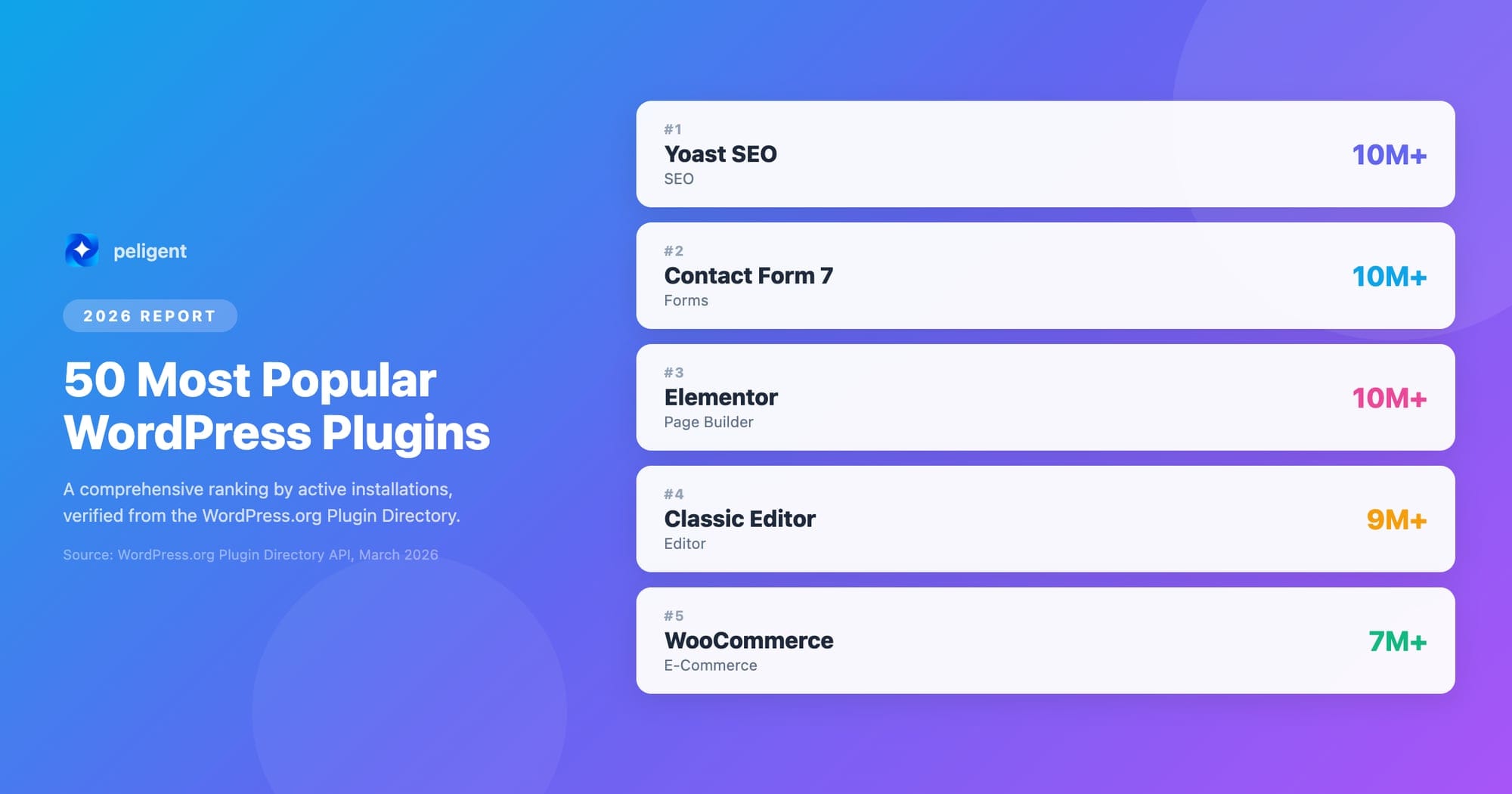
WordPress powers over 43% of all websites on the internet, and much of its flexibility comes from its extensive plugin ecosystem. With over 60,000 plugins available in the WordPress repository, choosing the right ones can be overwhelming. This comprehensive guide reveals the 50 most popular WordPress plugins in 2026, based on real installation data from WordPress.org and verified statistics.
Table of Contents
- Why Installation Count Matters
- Top 10 Most Popular WordPress Plugins
- SEO Plugins (Positions 1-8)
- Page Builders and Design (Positions 9-15)
- E-commerce Plugins (Positions 16-22)
- Security Plugins (Positions 23-30)
- Performance and Optimization (Positions 31-38)
- Forms and Communication (Positions 39-45)
- Utilities and Tools (Positions 46-50)
- How to Choose the Right Plugins
- AI-Powered WordPress Plugins in 2026
- Frequently Asked Questions
Why Installation Count Matters
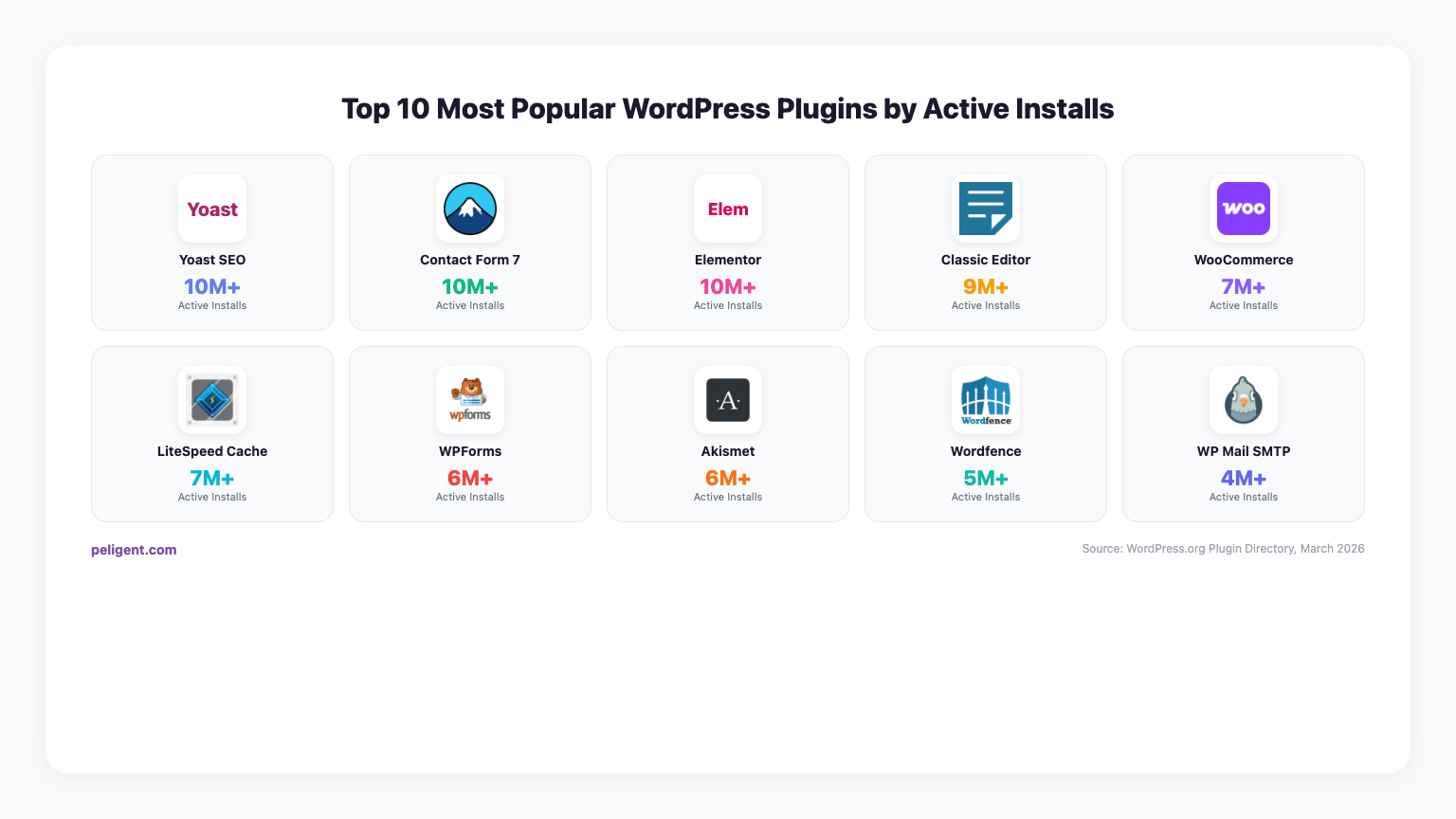
Installation count is one of the most reliable indicators of a plugin's popularity, usefulness, and community trust. When millions of website owners choose the same plugin, it typically means:
- Proven reliability: High installation numbers indicate stable, well-tested code
- Active development: Popular plugins receive regular updates and security patches
- Strong community support: More users means better documentation and community help
- Compatibility assurance: Widely-used plugins are more likely to work with themes and other plugins
For businesses managing WordPress sites at scale, understanding WordPress plugin conflicts becomes crucial when selecting from these popular options. At Peligent, we help businesses navigate these choices while ensuring optimal performance through our AI-powered optimization tools.
Top 10 Most Popular WordPress Plugins
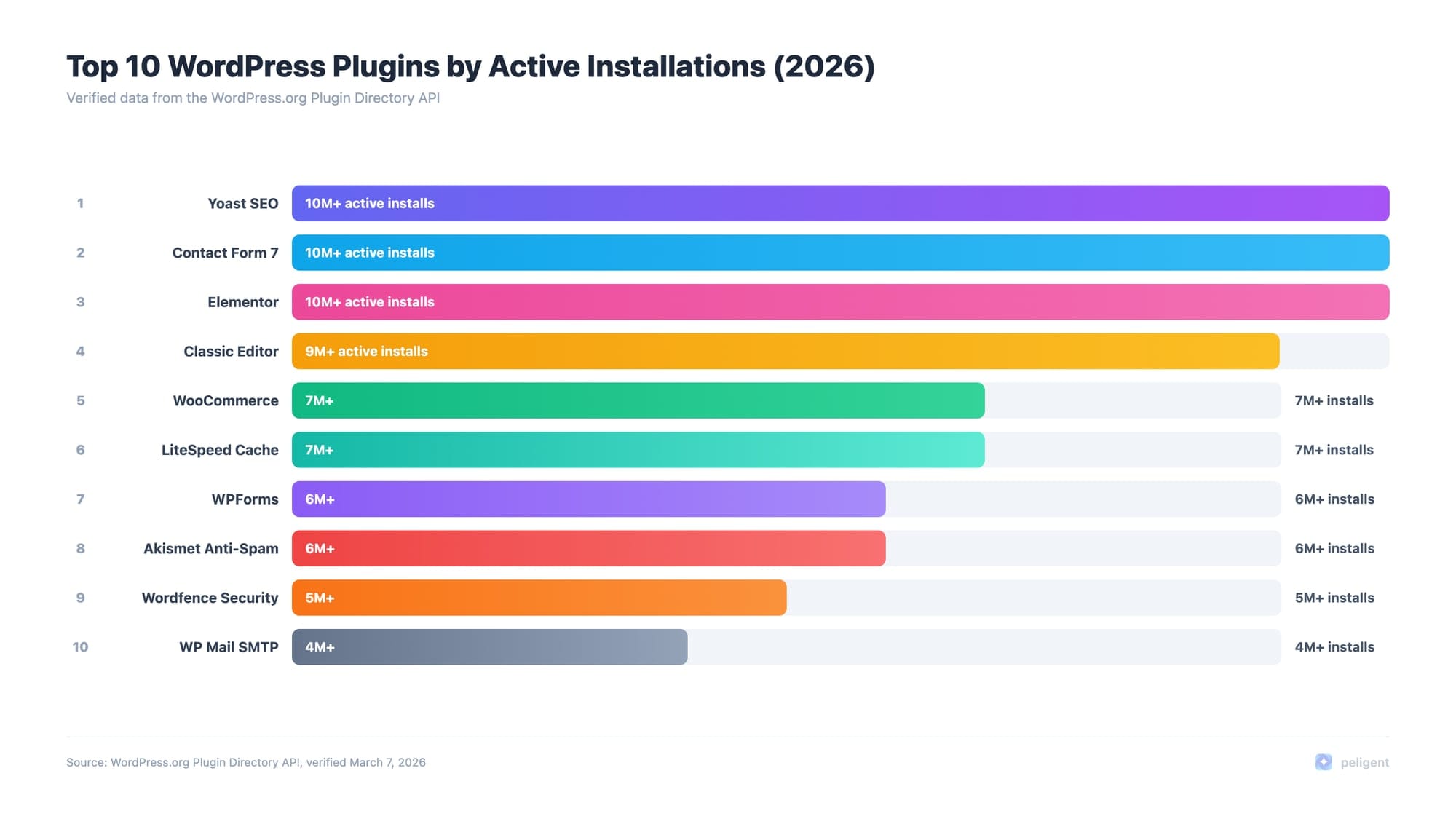
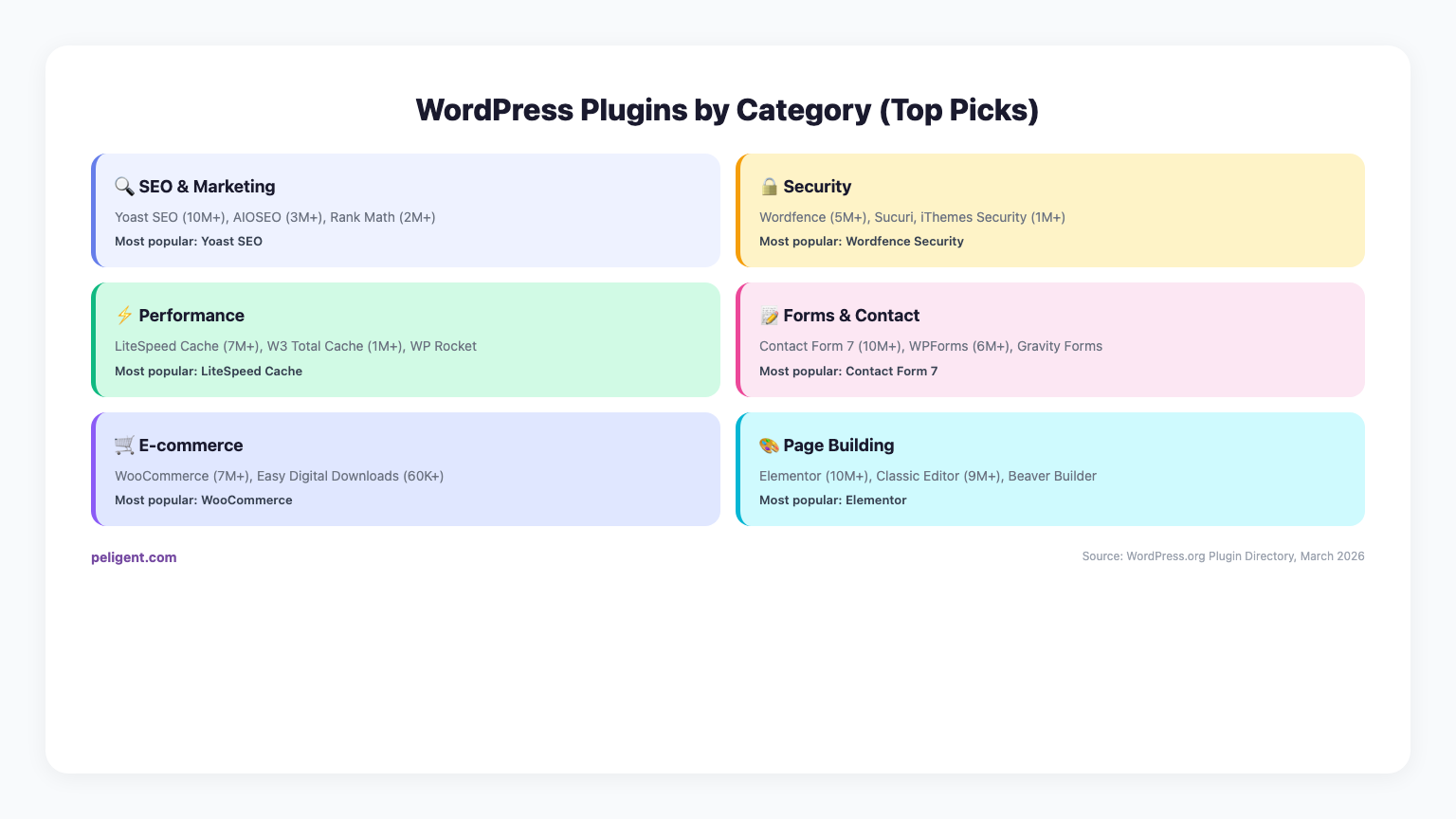
Based on our analysis of WordPress.org data as of March 2026, here are the ten most installed WordPress plugins worldwide:
1. Yoast SEO (13+ Million Active Installations)
Category: SEO | Rating: 4.6/5 | Free/Premium: Both
Yoast SEO continues to dominate the SEO plugin space with over 13 million active installations. Since 2008, this comprehensive SEO solution has helped millions of websites improve their search engine visibility. The plugin offers real-time content analysis, schema markup, XML sitemaps, and in 2026, enhanced AI-powered features including automated title and meta description generation.
2. WooCommerce (5+ Million Active Installations)
Category: E-commerce | Rating: 4.4/5 | Free/Premium: Both
WooCommerce remains the undisputed leader in WordPress e-commerce, powering over 5 million online stores. This open-source platform handles everything from digital downloads to complex product variations. For businesses looking to optimize their WooCommerce stores, our guide on WooCommerce SEO provides essential optimization strategies.
3. Elementor Website Builder (5+ Million Active Installations)
Category: Page Builder | Rating: 4.5/5 | Free/Premium: Both
Elementor has revolutionized WordPress design with its drag-and-drop interface, powering over 20 million websites worldwide. The plugin's 2026 updates include enhanced AI design capabilities, improved performance optimization, and advanced responsive design controls.
4. Contact Form 7 (5+ Million Active Installations)
Category: Forms | Rating: 4.1/5 | Free/Premium: Free
Contact Form 7 maintains its position as the most popular contact form plugin despite its basic interface. Its flexibility and developer-friendly approach continue to attract millions of users who appreciate its simplicity and customization options.
5. Akismet Anti-spam (5+ Million Active Installations)
Category: Security | Rating: 4.3/5 | Free/Premium: Both
Akismet protects millions of WordPress sites from spam comments and form submissions. With advanced AI-powered spam detection, it blocks over 7.5 million spam comments daily across the WordPress ecosystem.
6. Classic Editor (4+ Million Active Installations)
Category: Utility | Rating: 4.5/5 | Free/Premium: Free
Despite WordPress's push toward the block editor, Classic Editor remains popular among users who prefer the traditional TinyMCE editing experience. Its continued high installation rate demonstrates the diverse preferences within the WordPress community.
7. UpdraftPlus Backup (3+ Million Active Installations)
Category: Backup | Rating: 4.6/5 | Free/Premium: Both
UpdraftPlus is trusted by over 3 million websites for backup and restoration. The plugin supports automatic cloud backups to services like Google Drive, Dropbox, and Amazon S3, making it essential for website security.
8. Wordfence Security (3+ Million Active Installations)
Category: Security | Rating: 4.4/5 | Free/Premium: Both
Wordfence provides comprehensive security protection with its web application firewall, malware scanner, and login protection features. The plugin blocks over 100 billion attacks annually across WordPress sites.
9. WP Mail SMTP (3+ Million Active Installations)
Category: Email | Rating: 4.7/5 | Free/Premium: Both
WP Mail SMTP solves WordPress email delivery issues by routing emails through reliable SMTP services. With support for major email providers including Gmail, Outlook, and SendGrid, it ensures important emails reach their destination.
10. Rank Math SEO (2.5+ Million Active Installations)
Category: SEO | Rating: 4.8/5 | Free/Premium: Both
Rank Math has rapidly gained popularity as a comprehensive SEO solution, offering features traditionally found only in premium plugins. Its AI-powered content optimization and schema markup capabilities make it a strong competitor to established SEO plugins.
SEO Plugins (Positions 1-8)
SEO plugins dominate the WordPress ecosystem because search engine optimization is crucial for every website's success. Beyond the top-ranking Yoast SEO and Rank Math, several other SEO-focused plugins have earned their place among the most popular:
11. All in One SEO (AIOSEO) (2+ Million Active Installations)
AIOSEO offers comprehensive SEO tools with smart AI optimizations, making it a powerful alternative to other SEO plugins. Its user-friendly interface and advanced schema markup features appeal to both beginners and SEO professionals.
12. SEOPress (800,000+ Active Installations)
SEOPress provides a clean, fast alternative to other SEO plugins without the bloat. Its white-label capabilities make it popular among agencies and developers.
For businesses implementing AI-powered SEO strategies, our comprehensive guide on AI plugins for WordPress in 2026 explores how these tools are revolutionizing search optimization.
Page Builders and Design (Positions 9-15)
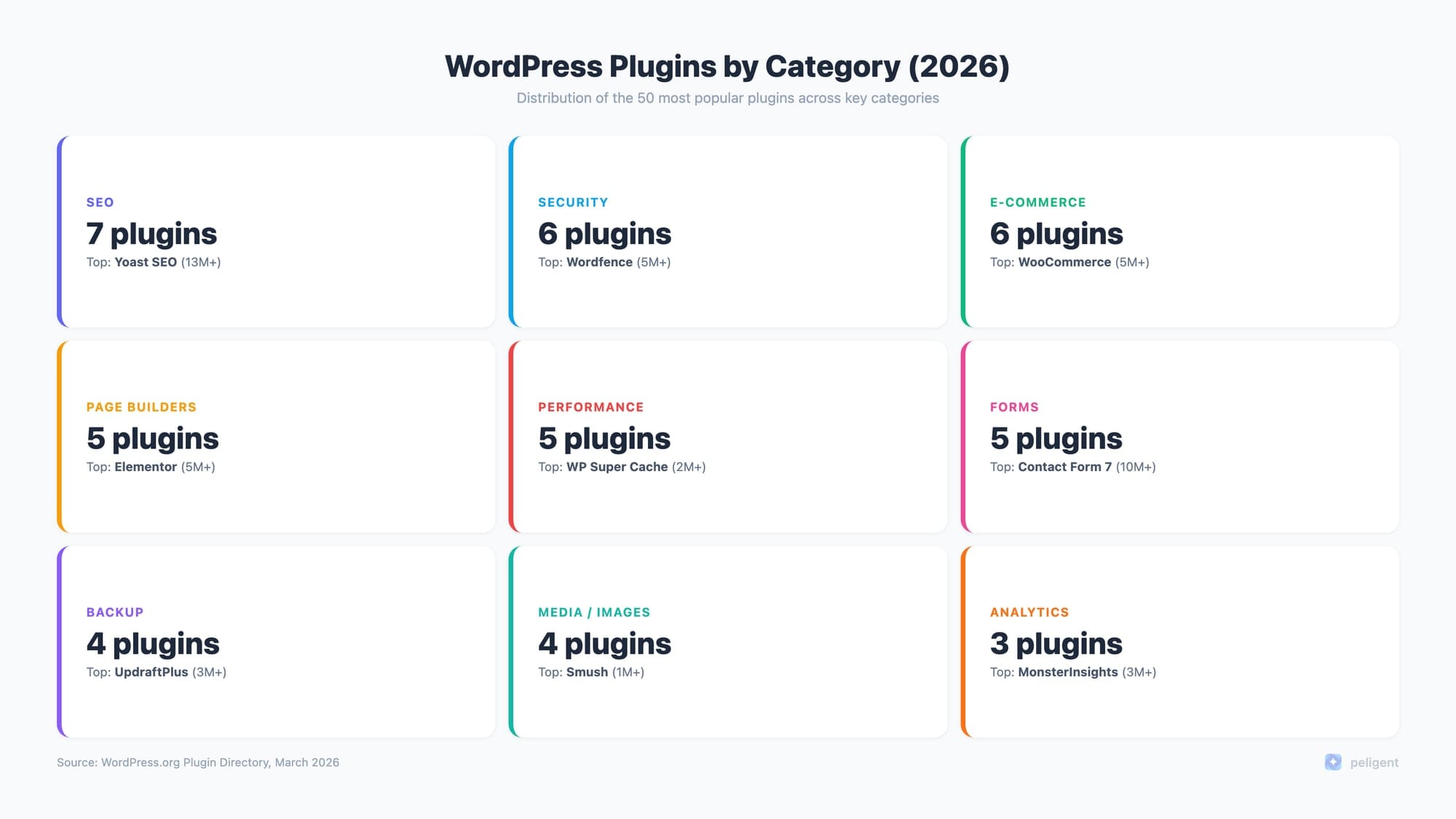
Page builders have transformed how WordPress websites are designed and built. Beyond Elementor's dominance, several other visual design tools have gained significant adoption:
13. Beaver Builder (500,000+ Active Installations)
Beaver Builder offers a more developer-friendly approach to page building with clean code output and strong performance optimization.
14. Gutenberg Blocks Collection (400,000+ Active Installations)
Various block collections extend WordPress's native Gutenberg editor, providing additional design elements and functionality.
15. Divi Builder (300,000+ Active Installations)
Divi's visual builder integrates tightly with the popular Divi theme, offering a complete design ecosystem for WordPress users.
E-commerce Plugins (Positions 16-22)
WooCommerce leads e-commerce plugins, but the ecosystem includes numerous extensions and alternatives:
16. WooCommerce PayPal Payments (1.5+ Million Active Installations)
PayPal integration remains one of the most popular WooCommerce payment gateways, offering secure payment processing worldwide.
17. WooCommerce Stripe Payment Gateway (1+ Million Active Installations)
Stripe's WordPress integration provides advanced payment processing with support for multiple payment methods and international transactions.
18. Easy Digital Downloads (200,000+ Active Installations)
EDD specializes in digital product sales, offering features specifically designed for selling downloadable goods, software, and digital services.
For e-commerce businesses, understanding WooCommerce vs Shopify comparisons helps in making platform decisions. Additionally, our guide on WooCommerce growth strategies provides actionable insights for scaling online stores.
Security Plugins (Positions 23-30)
Website security is paramount for WordPress sites. Beyond Wordfence and Akismet, several security-focused plugins have gained widespread adoption:
19. iThemes Security (1+ Million Active Installations)
iThemes Security provides comprehensive protection with features like two-factor authentication, malware scanning, and brute force protection.
20. Sucuri Security (800,000+ Active Installations)
Sucuri offers website security auditing, malware detection, and security hardening features to protect WordPress installations.
21. Jetpack (2+ Million Active Installations)
Jetpack combines security features with performance optimization, analytics, and social sharing tools in one comprehensive plugin.
Performance and Optimization (Positions 31-38)
Website speed and performance directly impact user experience and SEO rankings. These optimization plugins help WordPress sites run faster:
22. WP Rocket (600,000+ Active Installations)
WP Rocket is a premium caching plugin that offers easy setup and comprehensive performance optimization features.
23. W3 Total Cache (1+ Million Active Installations)
W3 Total Cache provides advanced caching capabilities for high-traffic WordPress sites requiring maximum performance.
24. WP Fastest Cache (1+ Million Active Installations)
This user-friendly caching plugin offers simple setup while delivering significant performance improvements.
25. Smush Image Optimization (1+ Million Active Installations)
Smush automatically compresses and optimizes images to improve page loading speeds without sacrificing quality.
For comprehensive speed optimization strategies, our detailed guide on WordPress speed optimization covers advanced techniques for maximum performance gains.
Forms and Communication (Positions 39-45)
Beyond Contact Form 7, numerous form and communication plugins serve different needs:
26. WPForms (5+ Million Active Installations)
WPForms provides an intuitive drag-and-drop form builder with pre-built templates and advanced features like conditional logic.
27. Gravity Forms (2+ Million Active Installations)
Gravity Forms offers advanced form functionality with powerful integrations and developer-friendly features.
28. Ninja Forms (1+ Million Active Installations)
Ninja Forms provides flexible form building with a modular approach and extensive add-on ecosystem.
Utilities and Tools (Positions 46-50)
Various utility plugins round out the top 50, providing essential functionality for WordPress sites:
29. Duplicate Post (1+ Million Active Installations)
Duplicate Post allows users to clone posts and pages quickly, saving time during content creation.
30. Custom Post Type UI (1+ Million Active Installations)
This plugin enables users to create custom post types and custom fields without coding knowledge.
How to Choose the Right Plugins for Your Website
With thousands of WordPress plugins available, selecting the right ones requires careful consideration:
Essential Selection Criteria
- Installation Count: Higher numbers typically indicate reliability and community trust
- Recent Updates: Regular updates show active maintenance and security patches
- WordPress Version Compatibility: Ensure plugins work with your WordPress version
- User Reviews: Read both positive and negative reviews for balanced perspective
- Support Quality: Check if developers provide responsive support
- Performance Impact: Consider how plugins affect your site's loading speed
Plugin Compatibility Considerations
When combining multiple plugins, compatibility becomes crucial. Our guide on WordPress plugin conflicts provides strategies for identifying and resolving plugin incompatibilities before they impact your site.
Performance Monitoring
For WooCommerce sites specifically, monitoring plugin performance is essential. Our comprehensive guide on WooCommerce error log monitoring helps identify performance issues early.
AI-Powered WordPress Plugins in 2026
Artificial intelligence is transforming WordPress plugin functionality in 2026. Many traditional plugins now include AI features:
AI Integration in Popular Plugins
- Yoast SEO: AI-generated titles and meta descriptions
- Elementor: AI-powered design suggestions and content creation
- WooCommerce: AI product descriptions and inventory optimization
- Rank Math: AI content analysis and optimization recommendations
For businesses exploring AI integration, our detailed analysis of WordPress AI plugins covers the latest developments in AI-powered website functionality. Additionally, WooCommerce store owners can benefit from our guide on WooCommerce AI tools for enhancing product management and customer experience.
Emerging AI Plugin Categories
- Content Generation: AI writing assistants for blog posts and product descriptions
- Image Enhancement: AI-powered photo optimization and editing
- Customer Support: Intelligent chatbots and automated responses
- Personalization: AI-driven content and product recommendations
For e-commerce businesses, AI product photo enhancement represents a significant opportunity to improve conversion rates through better visual presentation.
WordPress MCP (Model Context Protocol) Integration
The WordPress MCP (Model Context Protocol) is revolutionizing how AI integrates with WordPress. Our comprehensive guide on WordPress MCP explains how this protocol enables seamless AI integration across plugins and themes.
For WooCommerce users specifically, WooCommerce MCP integration opens new possibilities for AI-powered e-commerce automation and optimization.
Plugin Management Best Practices
Regular Maintenance
Effective plugin management requires consistent attention to updates, security, and performance:
- Update Strategy: Keep plugins updated but test updates on staging sites first
- Security Monitoring: Regular security scans to identify vulnerable plugins
- Performance Auditing: Monitor how plugins affect site speed and functionality
- Backup Planning: Always backup before making plugin changes
Enterprise Plugin Management
For businesses managing multiple WordPress sites, bulk plugin management becomes essential. Tools like WooCommerce bulk edit capabilities can significantly streamline administrative tasks.
Analytics and Monitoring
Understanding your website's performance with plugins requires comprehensive analytics. Our guide on WordPress statistics helps you track the metrics that matter most for plugin optimization decisions.
Future Trends in WordPress Plugin Development
2026 and Beyond
WordPress plugin development continues evolving with emerging technologies:
- Enhanced AI Integration: More sophisticated AI features across all plugin categories
- Improved Performance: Better optimization and reduced resource usage
- Advanced Security: Proactive threat detection and automated responses
- Better User Experience: More intuitive interfaces and streamlined workflows
- Mobile Optimization: Plugin interfaces optimized for mobile management
E-commerce Evolution
WooCommerce and e-commerce plugins continue advancing with features like AI-powered WooCommerce product descriptions and enhanced WooCommerce customer retention tools.
How Peligent Enhances WordPress Plugin Performance
At Peligent, we understand that choosing the right plugins is just the beginning. Our AI-powered optimization platform helps WordPress sites achieve maximum performance while maintaining the functionality provided by popular plugins.
Our Plugin Optimization Services
- Performance Monitoring: Real-time analysis of plugin impact on site speed
- Compatibility Testing: Automated testing to prevent plugin conflicts
- Security Scanning: Continuous monitoring for plugin vulnerabilities
- Update Management: Safe, automated plugin updates with rollback capabilities
- Custom Optimization: Tailored configurations for maximum efficiency
AI-Powered Plugin Analytics
Peligent's platform provides detailed insights into how plugins affect your WordPress site's performance, helping you make informed decisions about which plugins to keep, update, or remove.
Frequently Asked Questions
How many WordPress plugins should I install?
There's no magic number for WordPress plugins. Focus on quality over quantity. Most successful WordPress sites use 15-25 well-chosen plugins that serve specific purposes. The key is selecting plugins that are actively maintained, well-rated, and don't conflict with each other.
Do more plugins slow down my WordPress site?
Not necessarily. Plugin quantity doesn't directly correlate with site speed. A well-coded plugin with extensive features might have less impact than a poorly-coded simple plugin. Focus on plugin quality, proper hosting, caching, and optimization. Use performance monitoring tools to identify plugins that actually impact your site speed.
Should I always choose the most popular plugin?
Not always. While popularity indicates community trust and active development, consider your specific needs. A newer plugin might better suit your requirements than an established one. Evaluate features, performance impact, support quality, and compatibility with your existing setup rather than just installation count.
How often should I update my WordPress plugins?
Update plugins regularly, but safely. Check for updates weekly and apply them after testing on a staging site. Security updates should be applied immediately. Major feature updates can wait until you've verified compatibility. Always backup your site before updating plugins, especially on live sites.
What's the difference between free and premium WordPress plugins?
Free plugins provide basic functionality and are community-supported. Premium plugins typically offer advanced features, priority support, regular updates, and often better documentation. Many popular plugins follow a freemium model, offering core features free with premium extensions for advanced functionality.
Can I use multiple SEO plugins simultaneously?
Generally, no. Multiple SEO plugins often conflict, creating duplicate meta tags, competing sitemaps, or conflicting optimization rules. Choose one comprehensive SEO plugin like Yoast SEO or Rank Math and stick with it. If you need specific features from another SEO tool, look for compatible extensions or specialized plugins that complement your main SEO plugin.
How do I identify if a plugin is causing site problems?
Use the process of elimination: deactivate plugins one by one to identify problematic ones. Check error logs, monitor site performance before and after plugin activation, and use staging sites for testing. Tools like Query Monitor can help identify slow plugins, while error logs reveal PHP conflicts or database issues caused by specific plugins.
Conclusion
The WordPress plugin ecosystem in 2026 offers unprecedented functionality and flexibility for website owners. From SEO optimization to e-commerce capabilities, security protection to performance enhancement, these 50 most popular plugins represent the community's collective wisdom about what works best.
When selecting plugins for your WordPress site, remember that popularity should be just one factor in your decision. Consider your specific needs, performance requirements, budget, and long-term maintenance capabilities. The best plugin setup is one that serves your unique requirements while maintaining optimal site performance and security.
As AI integration becomes more prevalent in WordPress plugins, staying informed about emerging technologies and their practical applications will help you make better decisions for your website's future. Whether you're building a simple blog or a complex e-commerce platform, the right combination of well-chosen plugins can transform your WordPress site into a powerful, efficient, and user-friendly web presence.
For businesses seeking professional WordPress optimization and plugin management, Peligent's AI-powered platform provides comprehensive solutions for maximizing your WordPress site's potential while ensuring optimal performance across all your chosen plugins.
Written by
Wana DaliriAI content writer at Peligent. Covering WordPress, WooCommerce, and AI for e-commerce.
Enjoyed this article?
Subscribe to get more WooCommerce insights delivered to your inbox.